Nitrogen Launches Support for LPL Model Wealth Portfolios

Many LPL teams are fans of the Model Wealth Portfolio platform of actively managed funds that LPL provides to their advisors. Today, we’re excited to announce that we’ve made it incredibly simple and easy to evaluate and use MWP funds on Nitrogen.

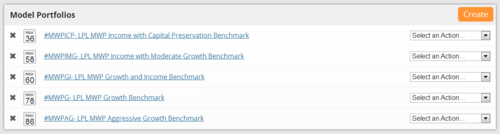
Every MWP fund fits within one of five benchmarks that LPL has established. We’ve created custom symbols to reflect those benchmarks, so you can easily add them to your model portfolios, or target portfolios that you build for clients.

The five custom symbols are:

    • #MWPICP — MWP Capital Preservation Benchmark

    • #MWPIMG — MWP Income with Moderate Growth Benchmark

    • #MWPGI — MWP Growth and Income Benchmark

    • #MWPG — MWP Growth Benchmark

    • #MWPAG — MWP Aggressive Growth Benchmark

You can simply add these symbols to your existing models, and allocate part of the model to them, or advisors who use MWP exclusively can simply create five models, with 100% of the portfolio in each respective benchmark.
image

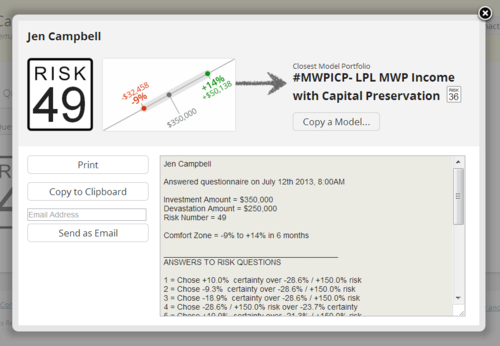
Once one of your prospects has completed the risk questionnaire, Nitrogen will quantify the suitability of each MWP benchmark for that specific client.
image

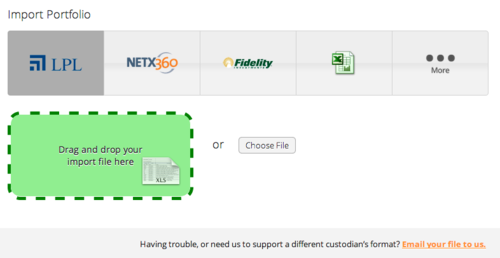
Once you’ve invested the client’s assets in the MWP platform, all of the individual holdings are reflected on the asset screen. You can use our LPL-compatible drag-and-drop portfolio integration to recheck portfolio alignment during your next client review.
image

We’re excited about the opportunity this creates for our LPL teams who love using the Model Wealth Portfolio platform. There is more to come as we continue to empower advisors to use risk to win new clients, capture and meet expectations and quantify suitability.


Ready to see Nitrogen in action? Request a demo and learn:

  • How the Risk Number® provides a quantitative way to talk about risk and return with your clients
  • How to capture a client’s Risk Number using our Risk Assessment
  • How to use Discovery, our fund screening tool, to search the universe of securities
  • How to research a rich set of analytics for individual stocks, ETFs, and mutual funds using Individual Security Analysis
Defeating Advisor Biases + Turning Statements into Sales Tools

By Michael McDaniel, Chief Investment Officer“It’s amazing what you find when you follow the math.”

That’s a statement that we’ve heard from many of our advisors, once they use Nitrogen for the first time in a prospect meeting or client review. There are two key discoveries we’ve been watching our advisors make over and over again.

Winning New Clients Gets Easier

In the experience of our advisors, about 4 of 5 prospective clients have far more risk than they realize, or is allowed by their risk tolerance. For this reason, they love showing a third-party, objective and quantitative representation of the risk in a prospect’s existing portfolio, while comparing it to their target portfolio.

In effect, the advisor is turning the prospective client’s existing statement into an amazing sales tool. Instead of that prospect trying to decide which advisor is more credible than the other, the Nitrogen advisor gets to set the benchmark for that assessment using data.

I personally love to see the look on a prospect’s face when they see the six month Historical Range™ for their current portfolio. Every single prospect who I’ve shown that analysis to — I’ve won their business.

Other things we hear: “Nitrogen is the best proposal system ever,” “this tool closes prospects for me,” and “I’ve replaced my sales pitch with simply showing prospects how much risk they have compared to my suggested portfolio.”

Defeating Advisor Biases Gets Easier

Advisors tend to have a bias towards managing client portfolios for their own risk tolerance, instead of the client’s. I first noticed this phenomenon with my own book of business (and since then, have been told the same thing by other advisors).

My personal risk number is 32, and no matter how many times I retake the questionnaire, if I’m using accurate dollar amounts that are meaningful to me and answering honestly, I can’t get it to come out as a different number.

Lo and behold, most of my client portfolios were clustered near my risk number, despite having clients with much higher risk tolerances. On the other hand, I’ve spoken to other Nitrogen advisors who had personal risk numbers in the 80s, and you guessed it — they were shocked when the bulk of their client portfolios had similar risk numbers.

You can imagine the implications of this bias. On the one hand, you can have clients falling short in the return department if they aren’t taking all of the risk they desire. On the other hand, clients could find themselves with far more risk than they can stomach.

Equipping themselves with the tools to quantify and match each client individually with the right portfolio has been a powerful way for advisors to defeat this bias and better deliver the personalized service to their clients that they’ve always been committed to.

Drag-and-Drop Portfolio Integration

Advisors across the country are using Nitrogen to align client portfolios with client risk tolerance. They do that with new clients — selecting the closest model portfolio, which Nitrogen can quantify for suitability. And they also do it when they review an existing client’s portfolio.

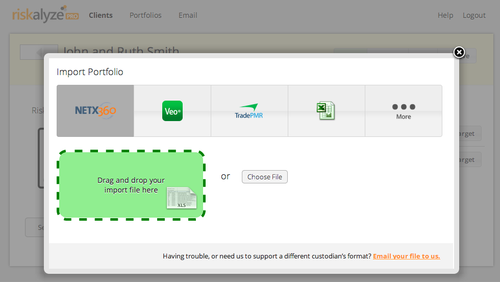
Today, we’re excited to announce that we’ve made the job of our advisors just a little easier by launching Drag-and-Drop Portfolio Integration inside of Nitrogen Pro.

Out of the box, it’s drag-and-drop simple to bring portfolio data in for your clients from most major custodial platforms and hundreds of broker-dealers — platforms like Pershing NetX360, LPL, TD Ameritrade Veo, TradePMR, Fidelity WealthCentral and National Financial.

And we’re adding more every week. When an advisor needs to use a different custodian’s file, they just email it to us…and we’re typically able to support it within 24 to 48 hours.

Here’s how it works. Every custodial platform makes it simple to drop an Excel or CSV file with the client’s holdings to your desktop.

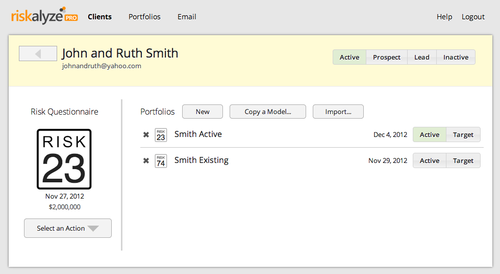
You open up that client’s profile in Nitrogen.

image

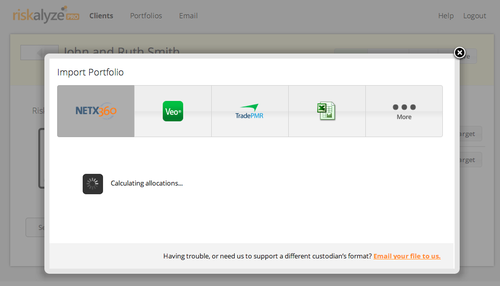
You click the Import button and drag the file into the Nitrogen window.

image

Nitrogen processes the allocations. If there are some new symbols you haven’t used before, it might take a minute or two. Often, it’s 10 seconds or less.

image

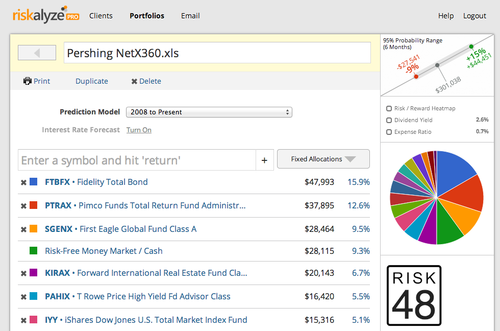
Boom. The portfolio is imported, and you’ve got an instant risk score to know whether the client’s current holdings are in alignment with their risk tolerance.

image

We’re excited to see how much time Drag-and-Drop Portfolio Integration is already saving our advisors who have been using it in preview.

Improving Deliverability of Risk Questionnaires

Since Nitrogen Pro launched, our advisors have created hundreds of risk questionnaires, which get sent to their clients via email. We’ve made a change to improve the deliverability of those email messages that we want our advisors to be aware of, and have the ability to change.

When a piece of software like Nitrogen Pro generates an email message, it has to set three variables inside the message: the sender’s name, the sender’s email address, and an email address that replies should go to.

One of the ways that spam filters try to stop junk email messages is by matching the sender’s email address back to the server that the message is coming from. If there’s no match, that increases the possibility that a given message is spam.

So we’ve made an important change. We’ve started setting the “sender’s email address” as advisor@nitrogenwealth.com. We still leave the sender’s name as the name of your firm, and we ensure that all replies go back to your email address.

That ensures that spam filters will see a match between the sender’s email address and our servers, greatly increasing the probability of the risk questionnaire being safely delivered to your client’s inbox.

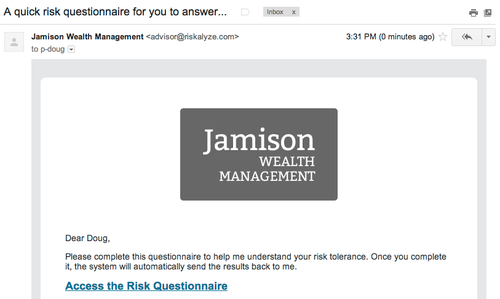
Here’s an example of how this looks to your client. Here’s a risk questionnaire email sitting in a Gmail inbox. As you can see, the name of the firm is who the message is from.

image

When the client opens the message, they see it in much the same way, but if you look closely, the sender’s address is advisor@nitrogenwealth.com.

image

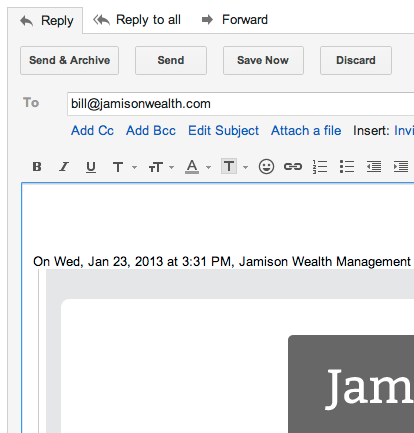
And if the client clicks reply to the message, they are immediately composing a message right back to your email address. We won’t receive a copy of that reply, nor will we even know if the client replied.

image

Now, a few questions you might have.

    • What happens if a client manually addresses an email to advisor@nitrogenwealth.com? That is a non-monitored mailbox. They will receive an automatic message back advising them to contact you directly, and we immediately delete their message for security reasons. (You can test this yourself by sending an email to advisor@nitrogenwealth.com.)

    • What if I absolutely must have the “sender email address” be my address? We can switch your account into “Manual Send” mode. This replaces the “Send Questionnaire” button with the ability to copy and paste the message text and link into your own email program, so you can send the questionnaire to the client like you would any other message. If you’d like us to switch your account into “Manual Send” mode, just make that request to support@nitrogenwealth.com.

We’re committed to making Nitrogen Pro be a smooth and seamless part of your client interactions, and this change is an important part of that. If you have any questions or concerns, don’t hesitate to let us know.

Schedule a Demo: