


5 Things You Didn’t Know You Could Do With Nitrogen Complete
Nitrogen built its reputation on a few foundational workflows: quantifying a client’s Risk Number®, analyzing a portfolio, building a proposal, and creating a plan clients can actually understand.
Those capabilities put Nitrogen on the map, and they’re still core to how advisors use it every day to create clearer conversations around risk and investment decisions.
But Nitrogen Complete goes well beyond where the story started.
Some of the most useful capabilities in the suite aren’t necessarily the ones that get top billing in a product overview. They’re the tools that help move a client relationship forward, like preparing for a meeting in less time or finding a seamless way to involve the next generation in an estate planning conversation.
That was the focus of our recent webinar, 5 Things You Didn’t Know You Could Do With Nitrogen Complete. Here’s a look at a few of the workflows worth knowing about.
1. Let Nucleus handle the busywork
Most advisors think of Nitrogen as a client-facing tool. But one of the more useful capabilities in Complete is what it can do behind the scenes.
That’s where Nucleus comes in.
During the webinar, Stephanie Moore, Senior Success Coach at Nitrogen, walked through how Nucleus works as a built-in assistant inside the client profile. Rather than navigating through multiple screens or handling routine tasks manually, advisors can simply ask Nucleus for help.
Moore shared an example of an advisor who wanted to introduce a client to the Risk Number before an upcoming meeting. Instead of drafting the message from scratch, the advisor could ask Nucleus to create the email and prepare the questionnaire for delivery. What might have taken several steps becomes a quick conversation inside the platform.
The same idea carries into other parts of an advisor’s workflow. Nucleus can update a client’s retirement assumptions and requires advisor approval before any changes are saved.
Advisors remain in control of client decisions and records, while routine administrative work becomes easier to manage.
2. Start beneficiary conversations before wealth changes hands
Many advisors have spent years helping a client build wealth, only to discover that when assets eventually transfer, the next generation has little connection to the advisor behind the plan.
That’s one of the challenges Legacy Center was designed to address. By creating a visual map of a client’s estate, advisors can help families better understand how assets, beneficiaries, and estate wishes fit together.
One lesser-known capability within Legacy Center, however, is Legacy Key. Rather than waiting until a wealth transfer occurs, advisors can invite beneficiaries into the conversation ahead of time and establish a direct line of communication.
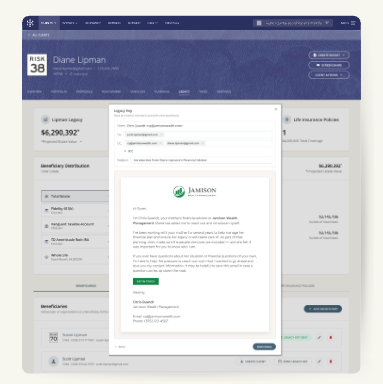
Rather than waiting for a major life event, advisors can use Legacy Key to start beneficiary conversations earlier.
That small step can have a meaningful impact. It gives beneficiaries a clearer understanding of their future role and helps families prepare for important transitions. It also allows advisors to begin building relationships long before major decisions need to be made.
3. Extend your brand beyond the meeting
Some of the capabilities featured in the webinar were complex. This one wasn’t.
Nitrogen Complete includes report branding tools that allow firms to customize client-facing reports with their own visual identity. Advisors can incorporate firm logos, colors, and contact information directly into the reports clients receive. Firms with multiple offices can also apply branding settings more broadly to create a consistent experience across teams.
It’s an easy feature to overlook because it doesn’t fundamentally change how advisors work. What it can change is how clients experience the work advisors are already doing.
Consistent branding helps reinforce the advisor’s identity and creates a more polished experience from one interaction to the next.
For larger firms, it can also reduce the burden of maintaining consistency across offices, allowing advisors to spend less time managing presentation details and more time focusing on client relationships.
4. Make your firm’s investment approach easier to scale
Many advisory firms have developed their own investment strategies over time. The challenge is making those strategies easy for every advisor in the firm to access and use consistently.
That’s where Custom Strategies comes in.
As demonstrated during the webinar, firms can add their proprietary strategies to Nitrogen and make them available across the platform. Once a strategy is set up, advisors can use it in portfolios and proposals without having to recreate the same work themselves.
For firms with multiple advisors or multiple offices, this can create a more consistent experience for both advisors and clients. Instead of building around a strategy from scratch, advisors can spend more of their time focused on the client conversation.
Like several of the other capabilities highlighted in the webinar, Custom Strategies isn’t necessarily something advisors discover on day one. But for firms looking to standardize their investment approach, it can become a valuable part of the workflow.
5. Turn a tax return into a planning conversation
Most clients don’t walk into a meeting excited to talk about their tax return. Even when a 1040 contains valuable planning information, the document itself isn’t always the easiest way to have that conversation.
But during the webinar, Stephanie demonstrated how Tax Center helps advisors transform a client’s tax return into a visual snapshot that’s easier to understand and discuss. Rather than working through pages of tax forms line by line, advisors can use a client-friendly dashboard to highlight key details and identify opportunities for further planning.
[ADD IMAGE]
Tax Center transforms a client’s 1040 into a visual snapshot, helping advisors spend less time explaining tax forms and more time discussing planning opportunities.
That can be especially valuable with prospects. A tax return often contains information that can lead to broader planning discussions, helping advisors demonstrate value before a formal planning engagement even begins.
What else are you not using?
Every advisor has experienced it: you start using a piece of technology for one purpose, then months later discover a capability that changes how you work.
The tools highlighted here may not be the first capabilities that come to mind when you think about Nitrogen Complete. But they illustrate how much value can be hiding in workflows that are easy to overlook.
Want to see what else you might be missing? Watch the full webinar or schedule a demo with the Nitrogen team.
FAQ
What is included with Nitrogen Complete?
Nitrogen Complete includes Nitrogen’s core tools for risk, portfolio analysis, proposals, research, and income planning, along with capabilities such as Tax Center, Legacy Center, Nucleus, report branding, and Custom Strategies.
How is Nitrogen Complete different from Nitrogen Elite?
Nitrogen Elite includes many of Nitrogen’s core centers. Nitrogen Complete sits above Elite and adds more capabilities under one subscription, including Tax Center and Legacy Center.
Does Nitrogen Complete include AI?
Yes. Nitrogen Complete includes Nucleus, Nitrogen’s AI-powered assistant. Advisors can use Nucleus to prepare for meetings, draft client communications, update information, and reduce manual work inside Nitrogen.
Can advisors use proprietary investment models in Nitrogen Complete?
Yes. Custom Strategies allows firms to add proprietary models and custom strategies to Nitrogen so advisors can use them in portfolios, models, and proposals.