


Tax Center
Tax returns are packed with information. Tax Center helps you put it to work. Upload a client’s return and turn complex tax data into clear visuals, interactive scenarios, and actionable insights you can bring into any conversation.

- Tax Snapshot

Upload a client’s 1040 and Nucleus™ transforms it into a simple, visual summary you and your client can understand at a glance.
Start with a clearer picture of filing status, income, tax rates, capital gains and losses, deductions, and other important details hidden inside the return.
- Tax Scenarios
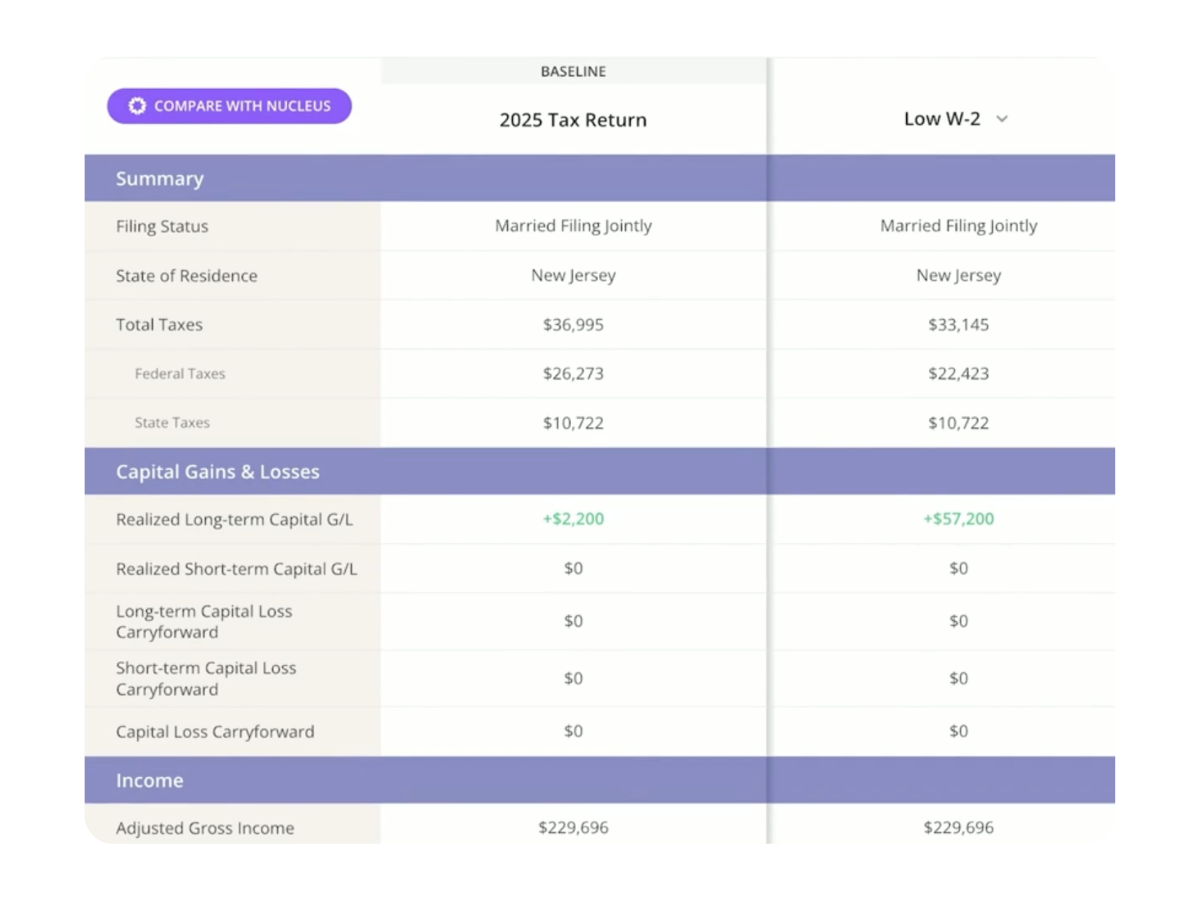
Turn “what if?” into something clients can see.
Adjust filing status, income, or capital gains to explore potential tax impacts without changing the client’s original Tax Snapshot. Compare multiple scenarios side by side with Tax Scenarios Multiview to help clients understand the trade-offs and make more informed decisions.
- Roth Conversion Calculator

Make the Roth conversion conversation more personal.
Ask Nucleus to create a Roth conversion scenario, and it uses known values from the client’s Tax Snapshot, Retirement Map, and portfolio to give you a pre-filled starting point.
Compare converting versus staying the course, see the potential lifetime tax impact, identify the break-even point, and illustrate the potential impact on inheritance value.
- Tax Location
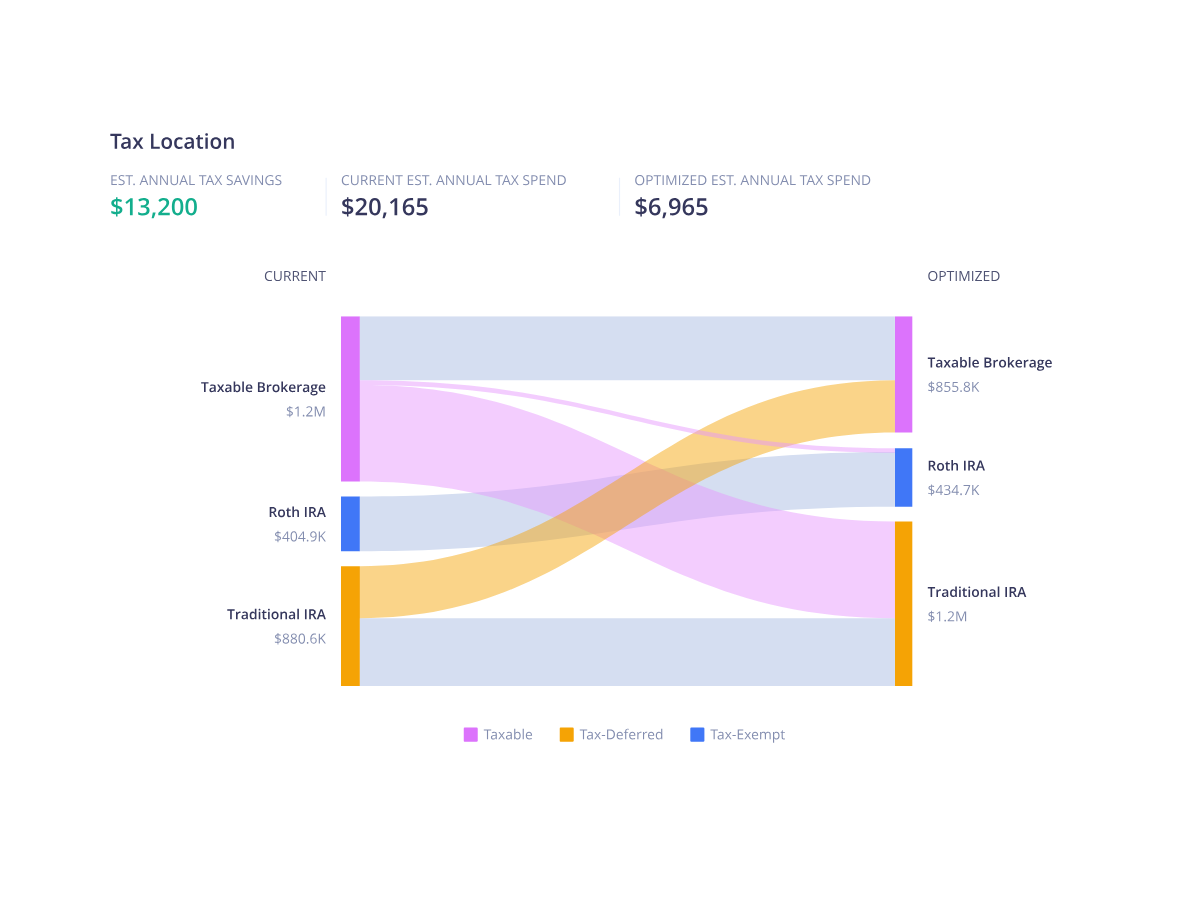
Identify investments that may be better suited for taxable, tax-deferred, or tax-exempt accounts.
See where assets are held today, explore potential improvements, and illustrate estimated annual tax savings with clear, client-facing visuals.
- Tax History
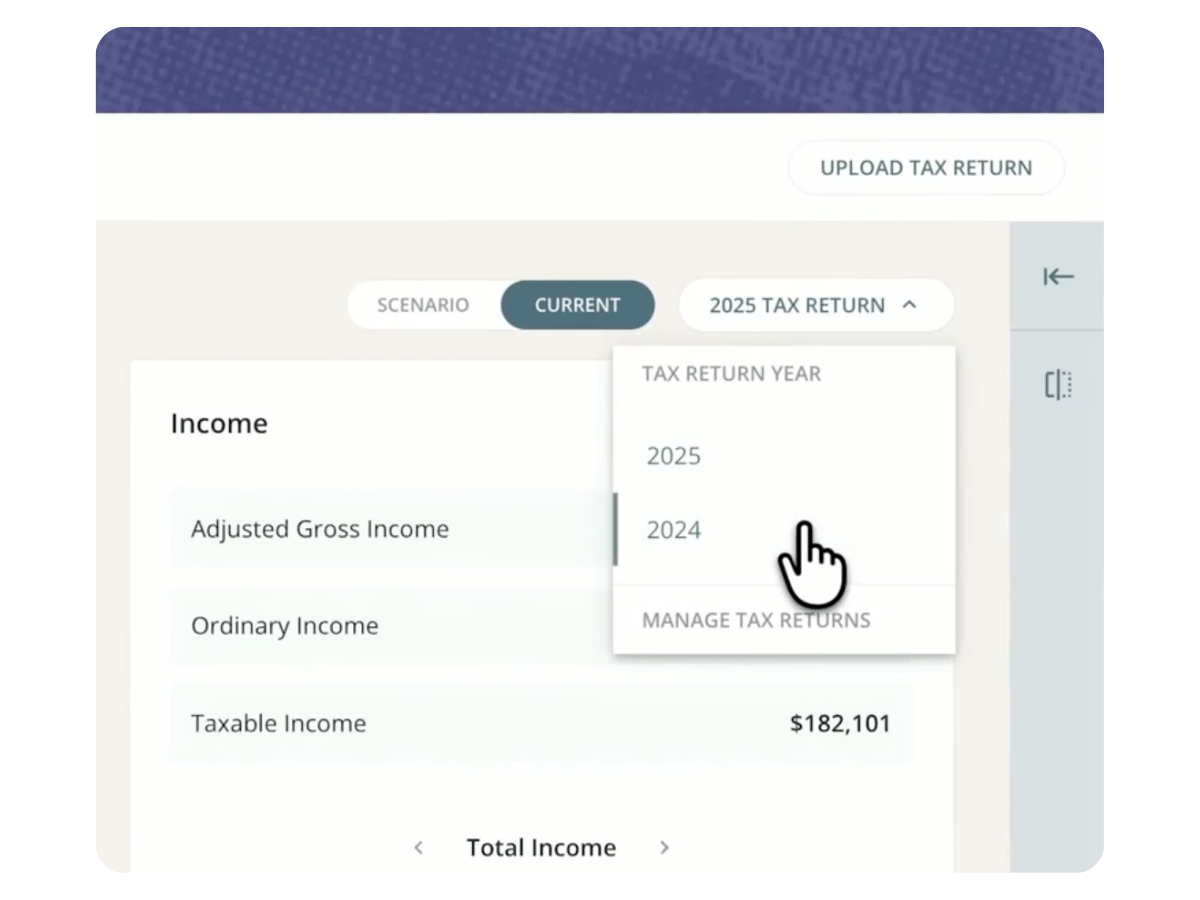
Keep multiple years of client tax returns in one place.
Switch between years to review income, deductions, tax brackets, and other details. Help clients understand what’s changed over time and identify opportunities for future conversations.
What advisors are saying

“This is the single best piece of software I have come across in 15 years of being a registered investment advisor.”
“Nitrogen helped us move over $1M in assets in the first three months. ”
“Nitrogen is an incredible piece of fintech. With a seamless user experience, clients of all ages are enjoying it. ”
“Nitrogen is client suitability and ethical practices defined. ”
“Nitrogen helped me save a $650,000 client, and connect with them on a whole new level. ”
“Nitrogen really gives my clients an edge in understanding risk. It is easily the best technology I use in my practice. ”
“The Risk Number is translational for our clients. They just get it. ”
“For all you advisors thinking of using Nitrogen, DON’T! I want this fantastic, incredible, game changing tool all to myself. With it, only I will be able to rule the entire investment world!”

“Nitrogen is such a great tool. I'm new to using it in my practice, and already can't imagine running my business without it.”

See Tax Center in action
Turn a tax return into a conversation your clients can see, understand, and act on.
Book a Demo
Tax Center is Nitrogen’s tax intelligence product for financial advisors. It turns a client’s tax return into a visual Tax Snapshot, interactive scenarios, Roth conversion analysis, and actionable insights that help advisors lead clearer tax conversations.
Tax Center turns information from a client’s tax return into a visual summary that can include filing status, income, tax rates, capital gains and losses, deductions, and other key tax information.
Tax Scenarios let you explore what-if questions without changing the client’s original Tax Snapshot. Adjust variables such as filing status, income, or capital gains and instantly see how those changes could affect the client’s tax picture.
Tax Scenarios Multiview lets you compare multiple tax scenarios side by side. Illustrate potential tax impacts across different financial decisions and help clients understand their options.
Ask Nucleus to set up a Roth conversion scenario, and it can pull known values from the client’s Tax Snapshot, Retirement Map, and portfolio to create a pre-filled starting point.
From there, you can compare converting versus staying the course and illustrate factors including lifetime tax impact, the potential break-even point, and projected inheritance value.
Tax Location helps advisors identify investments that may be better suited for taxable, tax-deferred, or tax-exempt accounts. It illustrates potential asset-location improvements and estimated annual tax savings.
Yes. Tax History keeps multiple years of tax returns in one place. Switch between years in Tax Snapshot to review past income, deductions, tax brackets, and other details.
Nucleus is Nitrogen’s agentic AI engine. In Tax Center, it helps do the work of transforming tax-return information and surfacing actionable insights, while the underlying intelligence and analysis give you a trusted foundation for the client conversation.
Tax Center is designed to give financial advisors clearer tax intelligence for client conversations. It does not replace the role of a tax professional or provide tax advice.
Tax Center is part of Nitrogen’s connected suite of advisor products. Client information across Nitrogen can work together to create more relevant analysis and clearer client conversations.
Book a demo to see Tax Center in action and learn how to add tax intelligence to more of your client conversations.