


Insurance Center
Give every client a clearer picture of their insurance coverage with the Coverage Number™. Insurance Center brings life insurance, long-term care, and retirement income protection into one clear number, helping you identify coverage gaps, compare recommendations, and show clients the impact of your advice.
- Coverage Number™

Every completed assessment produces a Coverage Number, a single figure that compares a client’s existing coverage against their calculated need. A number below 100 may signal a gap worth discussing. A number above 120 could point to excess or expensive coverage. Between 80 and 120 is typically considered on track. It’s the same swivel-the-monitor moment advisors already know from the Risk Number, now built for insurance.
- Insurance Coverage Assessment
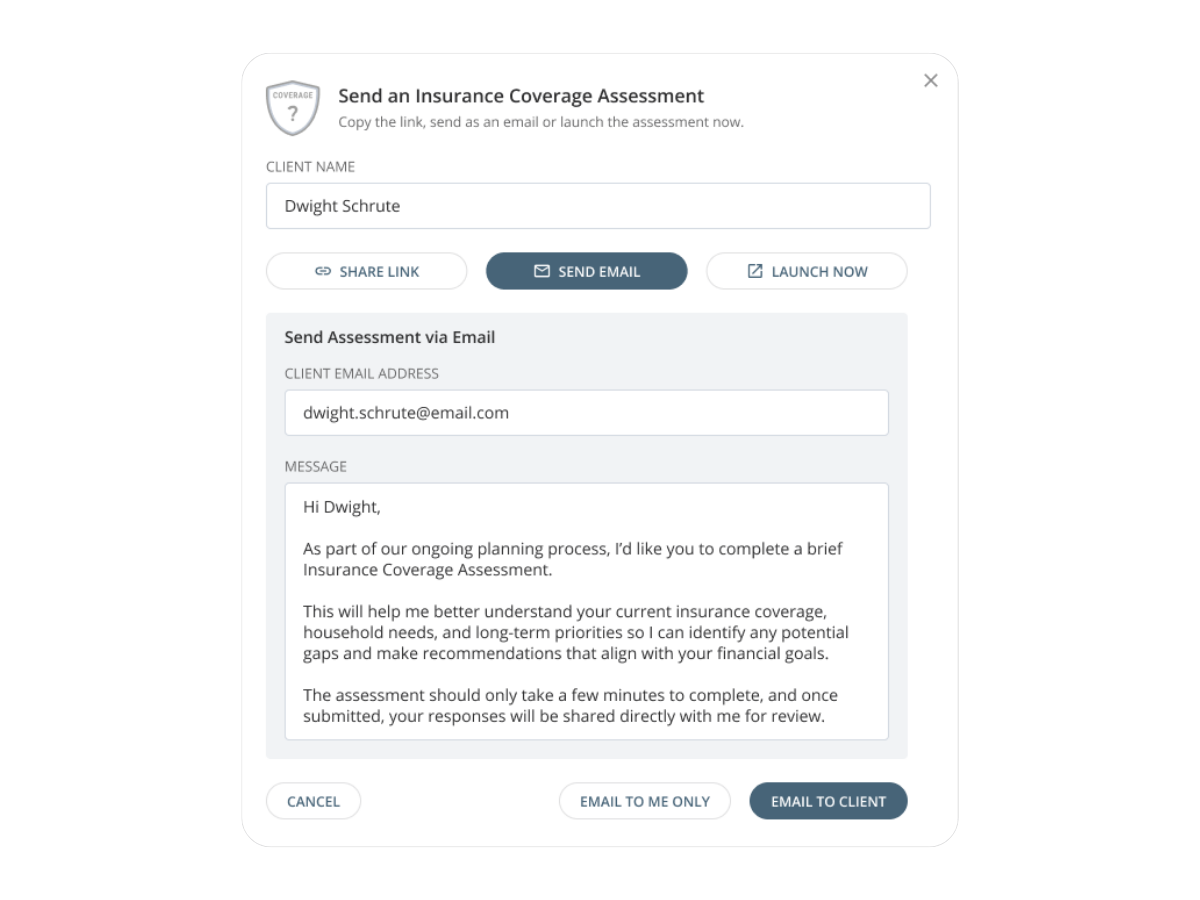
Insurance is one of the most important conversations you can have with a client, and one of the easiest to put off. The Insurance Coverage Assessment is a short, guided questionnaire that captures what Nitrogen can’t already see: who depends on a client’s income, education plans for their kids, outstanding debts, and any coverage already in place. Advisors can launch it live in a meeting or send it ahead of time for clients to complete on their own.
- From Gap to Proposal
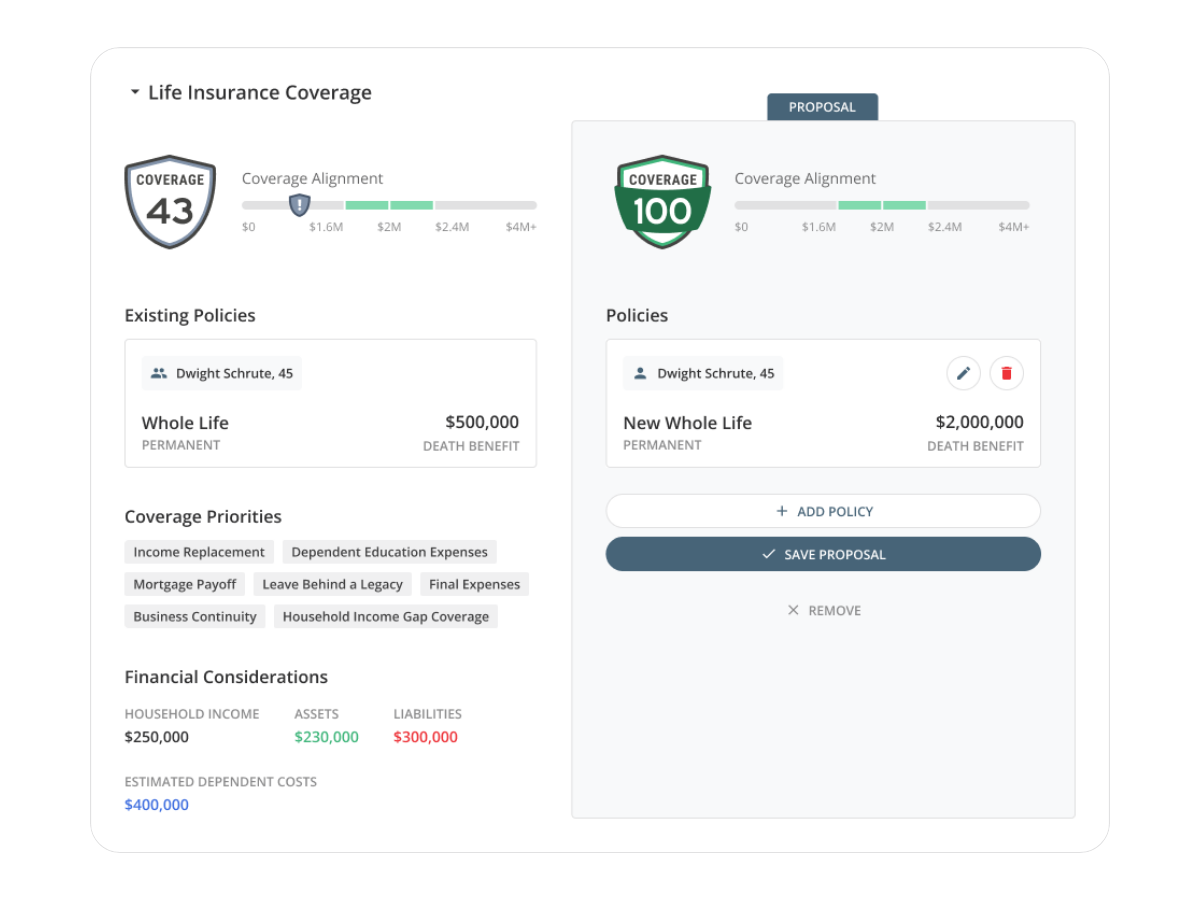
Once a gap surfaces, advisors can move straight into a proposal, compare existing coverage against recommendations, and watch the Coverage Number update in real time. When a client acts on a recommendation, mark it as implemented to update their current coverage and reflect the progress they’ve made.
- Household Coverage
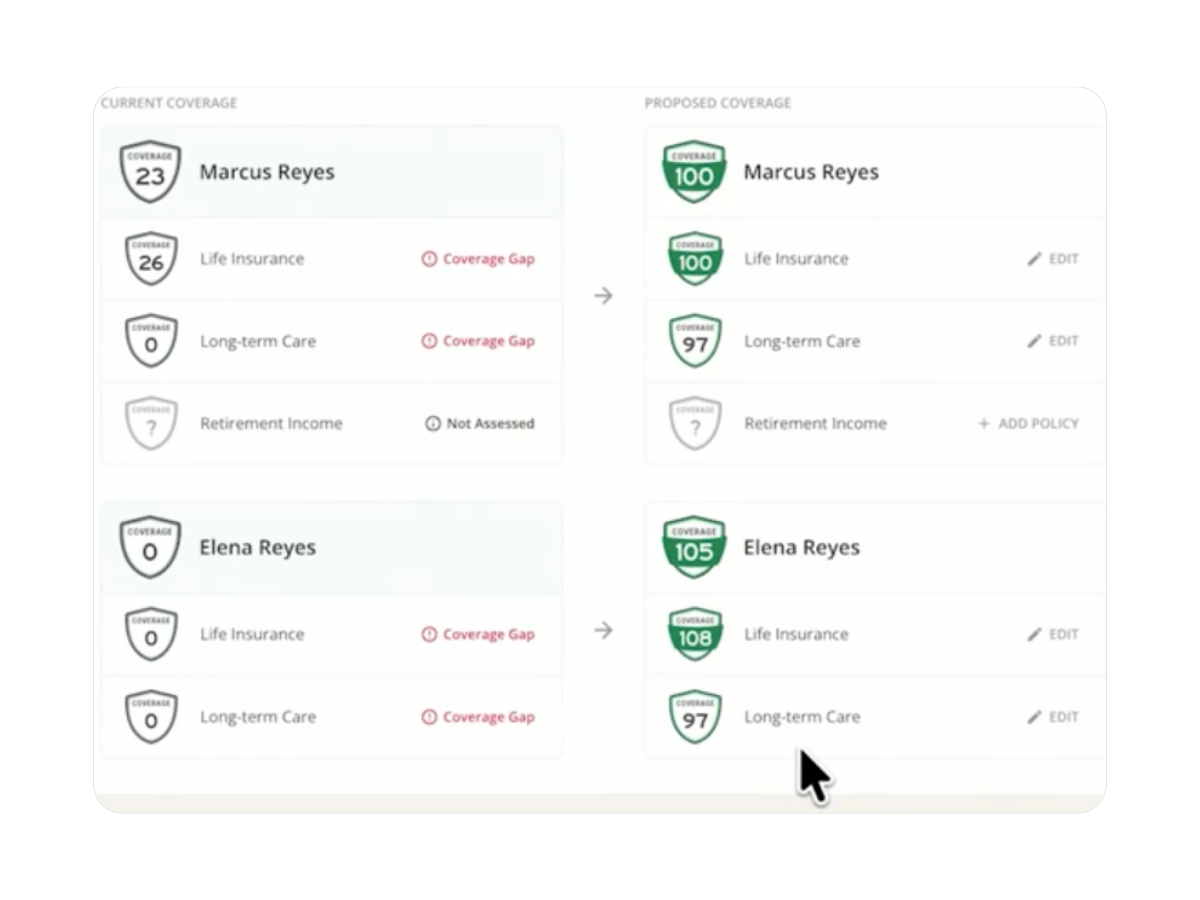
A household can appear fully protected while one spouse has a significant coverage gap. Insurance Center lets advisors assess each spouse individually, then see their Coverage Numbers side by side in a household view. Identify who needs additional protection, see how each person’s coverage affects the household, and build one proposal with recommendations for either spouse or both.
- Adjustable Insurance Needs
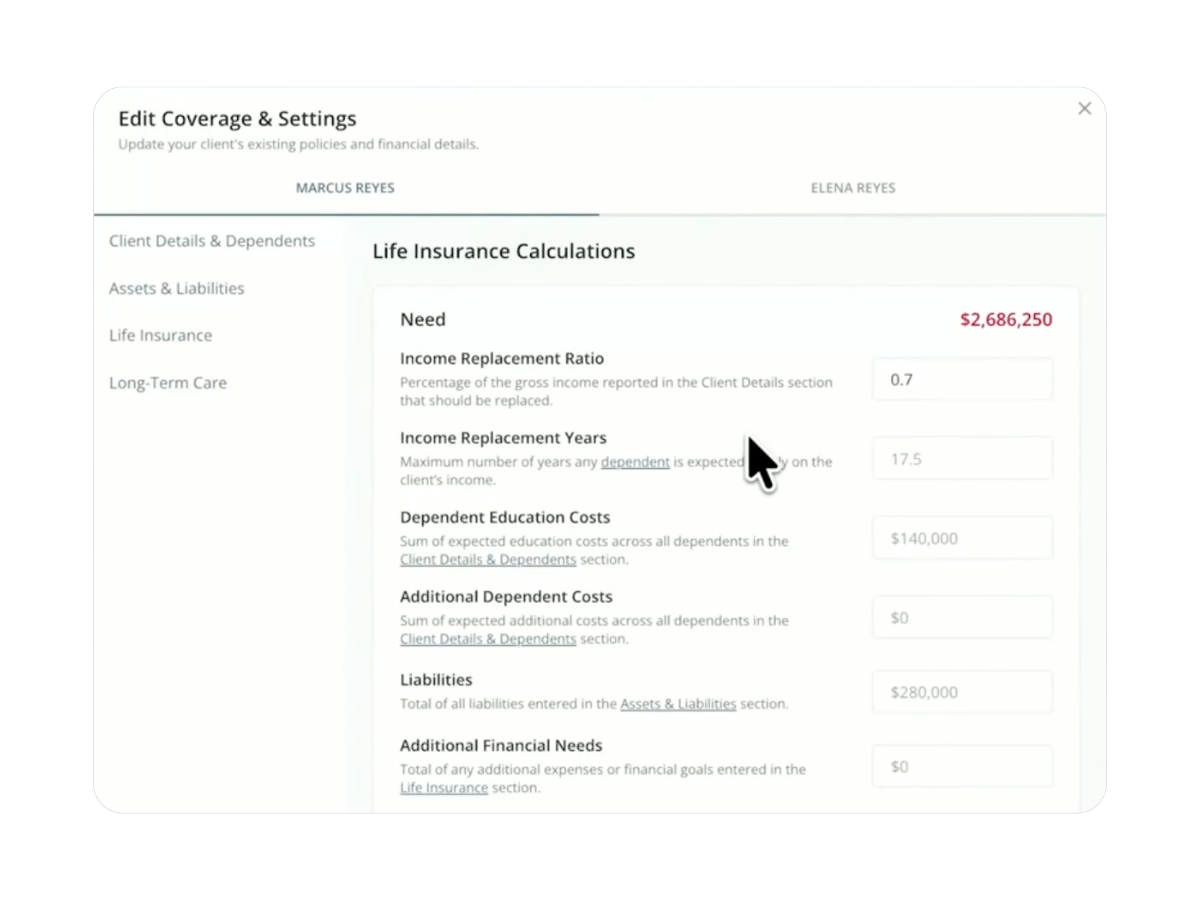
Every household has circumstances that a standard calculation can’t fully capture. Insurance Center gives advisors a closer look at the factors behind a client’s calculated insurance need, including dependency years and income replacement ratios. Adjust those assumptions, add specific financial goals, and watch the Coverage Number recalculate to reflect your professional judgment.
- Nucleus™ for Insurance Center
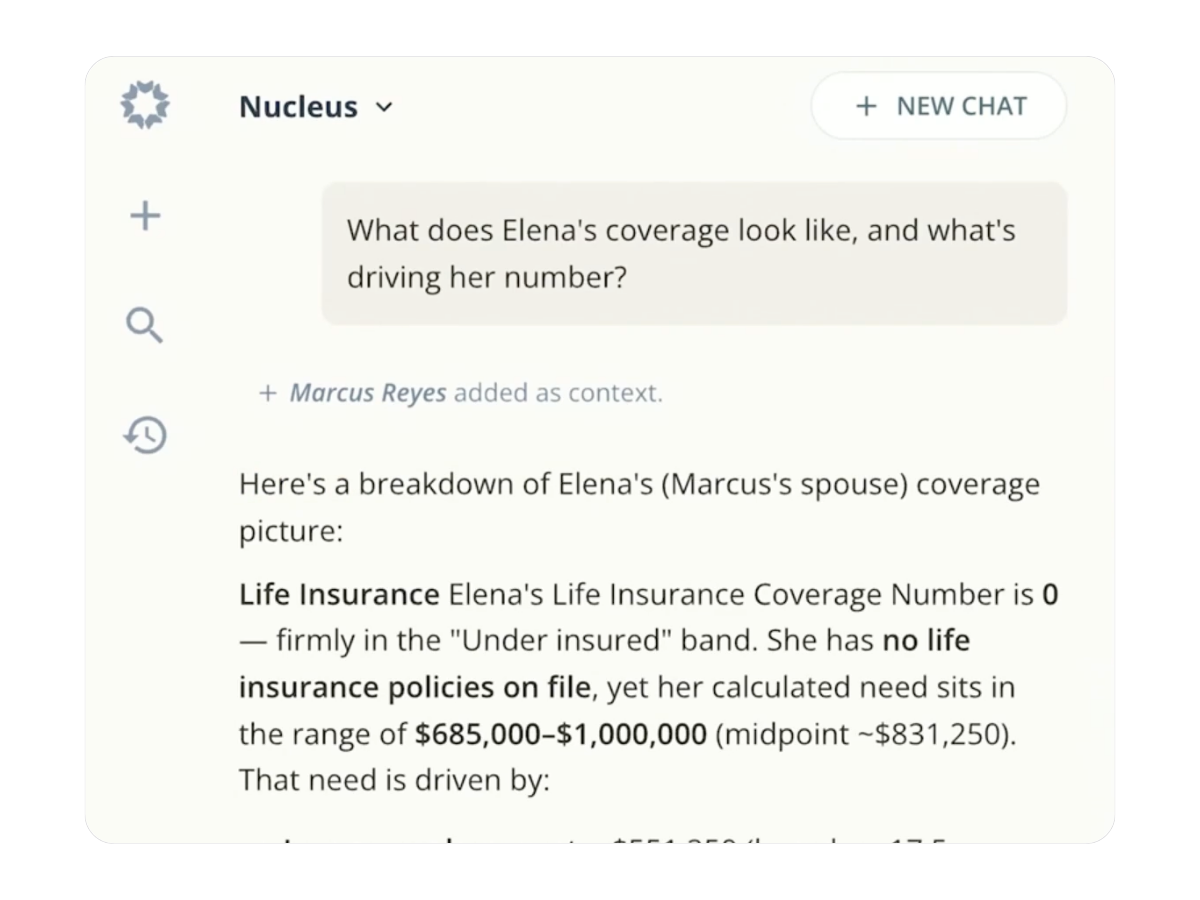
Nucleus brings Insurance Center into the conversation. Ask about a client’s existing coverage, what’s driving their Coverage Number, or which clients may be due for an insurance review. Nucleus can also send Coverage Assessments with advisor confirmation and help build insurance proposals, all using information already available in Nitrogen.

Life Insurance
Grounded in the DIME framework advisors already trust: debt, income, mortgage, and education. Coverage need reflects what a client’s household would actually need to replace.

Long-Term Care
Built on the Genworth/CareScout® Cost of Care Survey, tracking more than 14,000 providers and refreshed annually, specific to where a client plans to retire.

Retirement Income Coverage
Shows what percentage of a client’s essential retirement spending is covered by guaranteed income they can’t outlive, so the conversation covers more than a death benefit.
What advisors are saying

“This is the single best piece of software I have come across in 15 years of being a registered investment advisor.”
“Nitrogen helped us move over $1M in assets in the first three months. ”
“Nitrogen is an incredible piece of fintech. With a seamless user experience, clients of all ages are enjoying it. ”
“Nitrogen is client suitability and ethical practices defined. ”
“Nitrogen helped me save a $650,000 client, and connect with them on a whole new level. ”
“Nitrogen really gives my clients an edge in understanding risk. It is easily the best technology I use in my practice. ”
“The Risk Number is translational for our clients. They just get it. ”
“For all you advisors thinking of using Nitrogen, DON’T! I want this fantastic, incredible, game changing tool all to myself. With it, only I will be able to rule the entire investment world!”

“Nitrogen is such a great tool. I'm new to using it in my practice, and already can't imagine running my business without it.”

See Insurance Center in action
One number, one meeting, one clear next step for every client's coverage.
Book a Demo
Insurance Center gives advisors a structured way to assess a client’s insurance coverage across life insurance, long-term care, and retirement income. It’s built around the Coverage Number™, a single figure that compares what a client has against what they may need, so advisors have a clear, defensible starting point for the conversation.
Insurance Center is built for financial advisors, whether or not insurance is a product they sell directly. If insurance is already part of your practice, it gives you a faster, more structured way into proposals and product conversations. If it isn’t, it helps you spot gaps and considerations to loop in a specialist or refer out, if needed.
Insurance Center connects to the same client profile as the rest of the suite. Long-term care scenarios can be modeled directly in Income Center’s Retirement Map, and the Coverage Number sits alongside the Risk Number as another lens on a client’s overall financial picture. Insurance Center works well on its own, and it gets even more connected as you add other Nitrogen products.
No. The Insurance Coverage Assessment can be sent as a link or completed live in a meeting, and clients don’t need an account to complete it. Results are reviewed by the advisor on the Insurance Center dashboard.
Client responses are stored on the same secure client profile as the rest of their Nitrogen data, governed by the same permissions and security standards across the suite. Nitrogen is ISO 42001 certified.
Insurance Center is available now as a standalone plan, as an add-on to your current products, or included in Nitrogen Complete. Book a demo above, or reach out to your account manager to get it turned on.
Yes. Insurance Center supports individual assessments for spouses and brings their Coverage Numbers together in a household view. Advisors can identify coverage gaps for each person and create proposals with recommendations for one or both spouses.
Yes. Advisors can adjust factors such as dependency years, income replacement ratios, and specific financial goals. Insurance Center recalculates the client’s coverage need based on those inputs, allowing advisors to apply their professional judgment.
Advisors can mark accepted recommendations as implemented, moving them into the client’s current coverage. This updates the Coverage Number to reflect the client’s new coverage and helps maintain a record of what was recommended and implemented.
Nucleus can answer questions using current Insurance Center data, help identify clients who may be due for a coverage review, send Coverage Assessments with advisor confirmation, and assist with building insurance proposals.
Yes. Insurance Center evaluates retirement income coverage as part of a client’s overall protection needs. Advisors can use it alongside Risk Center and Income Center to illustrate how an annuity may affect portfolio risk, guaranteed retirement income, and the client’s Coverage Number.