


How Legacy Center Helps Advisors Build Multigenerational Client Relationships
Many advisors spend decades earning a client’s trust. But when wealth transfers to the next generation, there’s no guarantee that relationship will transfer with it.
Legacy planning gives advisors a chance to change that. By bringing beneficiaries into the conversation before assets change hands, advisors can begin building familiarity long before an inheritance becomes a reality.
That’s one of the reasons we introduced Legacy Center, Nitrogen’s newest tool for multigenerational planning. This new feature helps advisors have more meaningful estate conversations, engage the next generation, and create a stronger experience for the families they serve.
To help advisors get started, we recently hosted a webinar demonstrating how Legacy Center fits into a client review meeting. The session focused on three practical workflows advisors can begin using right away, along with a few tips for getting the most from the new product.
Want to see the complete walkthrough? Check out the full webinar on-demand here.
Start every legacy conversation with a shared visual
Legacy planning is easier when clients can see the bigger picture.
Estate information often lives in separate places. A trust sits in one document. A beneficiary designation lives somewhere else. The client understands each piece on its own, but connecting them during a conversation isn’t always easy.
Legacy Map brings that information together in one visual view. Instead of walking through paperwork, advisors can guide clients through a clear picture of their legacy and how they intend to pass it on.
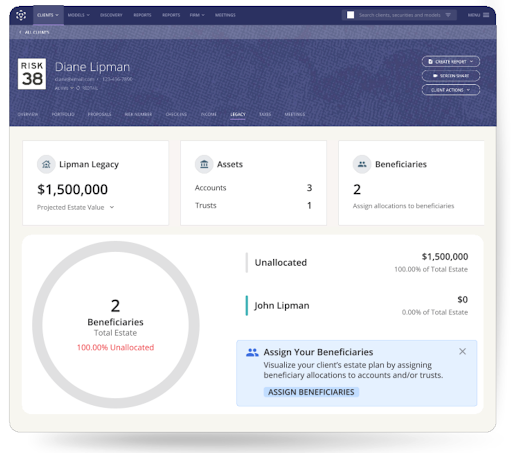
Legacy Map brings a client’s estate into one clear view, giving advisors and clients a shared starting point for legacy planning conversations.
Clients often ask better questions because they can see their plan unfold in front of them. Advisors can spot planning opportunities more naturally, whether it’s an outdated beneficiary designation or an asset that hasn’t been included in the discussion.
The meeting also becomes more collaborative. Rather than explaining information the client already owns, advisors can focus on helping clients think through the decisions ahead. Those conversations reinforce the advisor’s role as a long-term planning partner while creating a strong foundation for the next step: bringing beneficiaries into the conversation.
Once clients have a clear picture of their legacy, the next conversation becomes much easier: deciding how and when to introduce the people who will one day inherit it.
Make beneficiary introductions part of your planning process
The best time to meet a client’s beneficiaries is while the client can make the introduction.
Instead of meeting after a major life event, advisors have an opportunity to connect while the client is still part of the conversation. They can provide context, explain the relationship they’ve built over the years, and help establish trust from the very beginning.
That’s where Legacy Key comes in.
After adding a beneficiary to Legacy Map, advisors can send a personalized introduction through Nitrogen. The message can be customized with the client’s input and shared through the platform or from the advisor’s own email. The beneficiary receives the advisor’s contact information in a simple, mobile-friendly format, making it easy to save for future reference.
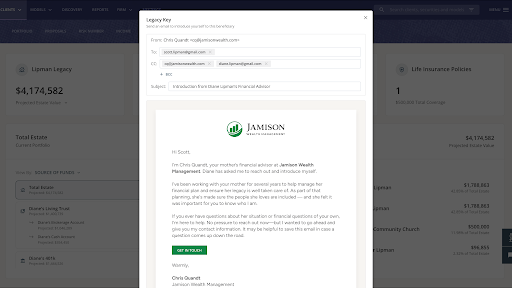
Legacy Key helps advisors make a warm introduction while the client is still part of the conversation, creating familiarity before wealth changes hands.
The technology makes the introduction easy. The real value comes from what happens next.
Imagine a client introducing you to her daughter during a review meeting. Together, you send a Legacy Key before the meeting ends. Months or even years later, when she has a question about her family’s financial plan, she isn’t searching for an advisor online or sorting through paperwork to figure out who managed her parents’ accounts. She already knows who to call.
Instead of starting from scratch, the advisor builds on a relationship that began with the client’s endorsement. The beneficiary knows who you are, understands your role, and has already seen the value you provide to their family.
Legacy Key also gives advisors a repeatable way to make these introductions. Rather than relying on memory or waiting for the “right time,” the introduction becomes a natural next step after completing a client’s Legacy Map.
Over time, those small introductions can help create stronger multigenerational relationships. Clients gain confidence knowing their family has a trusted point of contact, while advisors create opportunities to stay connected as wealth moves from one generation to the next.
Give every legacy conversation a next step
Legacy planning rarely ends with a single conversation. Clients often leave a meeting with questions they want to think through or discuss with their family before making a decision.
Legacy Map Reports help keep that conversation moving.
After updating a client’s Legacy Map, advisors can generate a personalized report through Nitrogen’s Report Builder. The report captures the client’s legacy in a clear, visual format that’s easy to review after the meeting.
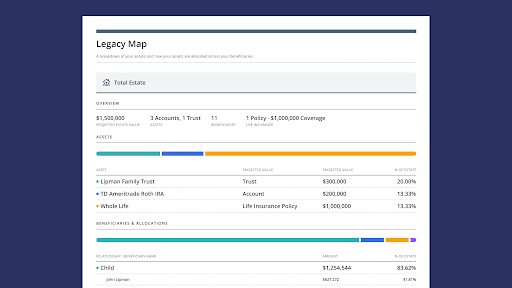
Legacy Map Reports give clients a clear reference they can revisit after the meeting, making it easier to continue the conversation over time.
That simple takeaway can extend the value of the conversation. Instead of relying on memory or handwritten notes, clients leave with a personalized resource they can revisit, share with family members, or bring into future planning discussions.
The report also gives advisors a natural way to continue the relationship. Future review meetings can start with the existing Legacy Map, making it easy to discuss what has changed and identify new planning opportunities over time.
Legacy planning is an ongoing process. Legacy Map Reports help advisors carry those conversations from one meeting to the next, creating a more connected experience for clients and a repeatable workflow for the firm.
Putting Legacy Center into practice
The webinar closed with one final recommendation for advisors who are just getting started: build your own Legacy Map first.
Walking through the experience yourself is one of the easiest ways to become comfortable with the workflow before introducing it to clients. You’ll see the product from the client’s perspective, anticipate common questions, and develop language that feels natural in a meeting.
Want to see the complete walkthrough? You can watch the full webinar to see Legacy Center in action from start to finish here.
Ready to bring Legacy Center into your client experience? Book a demo to learn how your firm can start building stronger multigenerational relationships.
Frequently asked questions
What is Legacy Center?
Legacy Center gives advisors a structured, intentional way to map a client’s estate and build a relationship with the next generation before a wealth transfer occurs. It includes Legacy Map, Legacy Key, and a report element advisors can add to any client deliverable.
What is Legacy Map?
Legacy Map pulls from data already in Nitrogen to build a complete visual picture of a client’s estate: accounts, trusts, insurance policies, and beneficiaries, all tied to real projected dollar amounts. Advisors can view the picture by account, by trust, or by beneficiary, giving clients a clear, shared reference point for legacy conversations.
What is Legacy Key?
Legacy Key is a personalized, advisor-branded introduction sent directly to a beneficiary through Nitrogen. It’s client-approved and includes the advisor’s contact information, a simple guide for what to do if something happens, and a landing page with clear next steps.
Can advisors customize a Legacy Key?
Yes. Advisors can edit the message before sending it, and can share it through their own firm inbox using the link provided in Nitrogen.
Does Legacy Map account for trusts and life insurance?
Yes. Advisors can group accounts into trusts and include life insurance policies as part of the estate picture, with allocation percentages assigned to beneficiaries for each.
How does Legacy Map calculate projected inheritance values?
Legacy Map uses data already in Nitrogen, including a client’s portfolio and income projections, to show real projected dollar amounts for each beneficiary. If the client has a Retirement Map built in Income Center, Legacy Map uses those projected end-of-life values for an even more accurate picture. Otherwise, it uses the client’s current portfolio values.
Can Legacy Map be included in a client report?
Yes. Legacy Map is available as a report element in Reports Builder. Advisors can add it to any client deliverable to produce a clean, multi-page PDF of the complete estate picture, advisor-branded and printable, so clients and their families have something to hold onto long after the meeting ends.
What is the Great Wealth Transfer?
The Great Wealth Transfer refers to the estimated trillions of dollars in assets that will pass from Baby Boomers to their children and grandchildren over the next two decades. For advisors, it’s the reason next-gen relationships matter now: when that transfer happens, assets tend to follow whichever relationship the family already trusts, and today that’s rarely the beneficiary’s own advisor. Legacy Center gives advisors a way to start building that trust before the transfer occurs, not after.