


Summer 2026 Product Launch: Introducing Insurance Center and the Coverage Number™
Our Summer 2026 Product Launch was the highest turnout of any product launch event we’ve hosted. The reaction says why: this release includes the biggest addition to the Nitrogen suite since the Risk Number® itself.
In this release, we showcased the enhancements and new releases to drive more Catalyst Moments: the point where an advisor helps a client see something important about their financial life more clearly, opening the door to what happens next. For years, that’s meant risk and retirement conversations. Then tax and legacy planning. This release adds Nucleus in more places, an enhanced Tax Center, and a brand-new product built around an entirely new metric.
Here’s everything that shipped, ending with the announcement advisors have been asking us about ever since the event ended.
Nucleus goes everywhere advisors work
Earlier this year, we introduced Nucleus, Nitrogen’s AI agent for advisors. Since then it’s become part of daily workflows, turning statements into portfolios and building client-ready deliverables. Until now, most of that work started from the client profile. This summer, Nucleus expands across the entire suite.
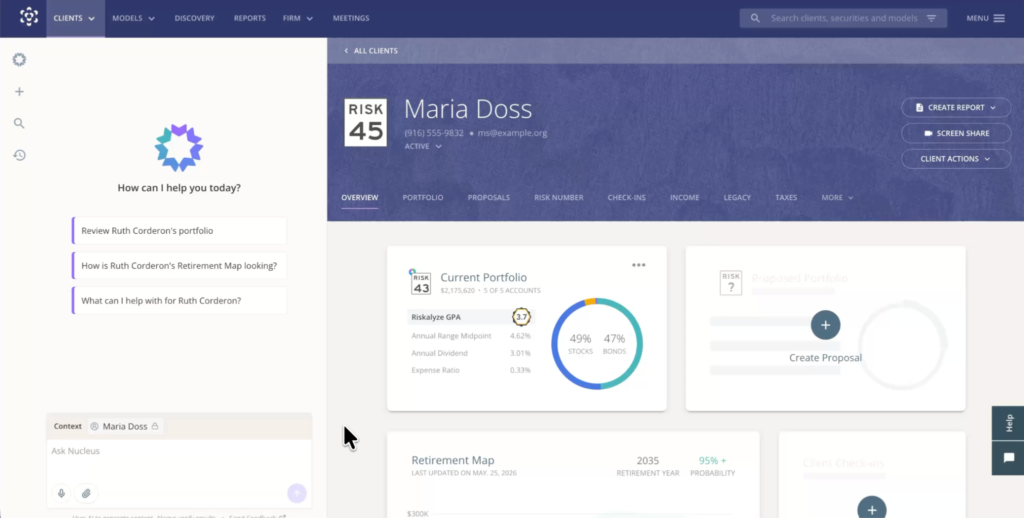
Advisors can now start a conversation with Nucleus before ever attaching a client, then bring client context in when the moment calls for it, without losing the thread. Say an advisor is researching investments in Discovery. They can work with Nucleus without mentioning a client, then pull a specific client into the same conversation the moment an idea clicks. Searchable chat history makes it easy to pick that thread back up later.
Nucleus also reaches beyond Nitrogen’s platform. Advisors can bring permissioned Nitrogen information into Slack and Microsoft Teams, and connect Nucleus to ChatGPT and Claude. Nitrogen MCP extends that access further, letting firms build their own AI agents on top of Nitrogen.
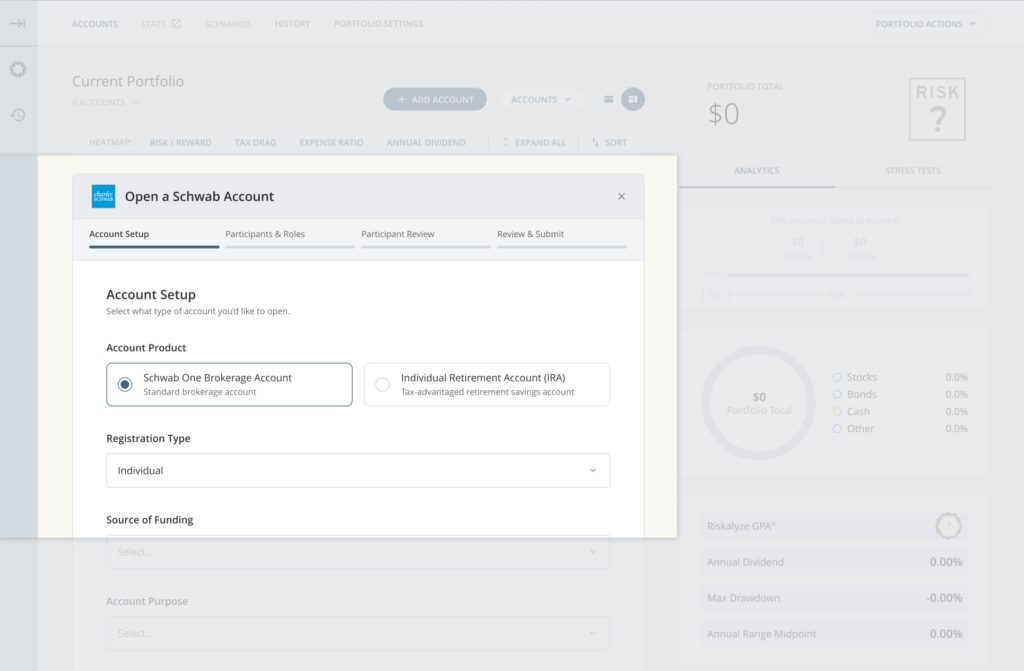
And when a proposal turns into new business, Nucleus can carry that work forward. Nucleus Account Opening with Schwab launched, and Nitrogen is among the first platform anywhere to showcase Schwab’s new account-opening APIs. Nucleus pre-fills account-opening details from information already in Nitrogen, the advisor reviews and submits without leaving Nitrogen, and a pending account shows up right in the client’s portfolio to track status. Once Schwab completes the account, it reconciles automatically, no duplicate entry required. Rollout begins with eligible shared customers this fall, ahead of Schwab’s Impact event.
The result: less manual work, less re-entry, and more time for the conversations and follow-up that actually grow a practice.
Tax Center gets three big upgrades
Tax Center is already Nitrogen’s fastest-growing product, and this release moves it forward on three fronts.
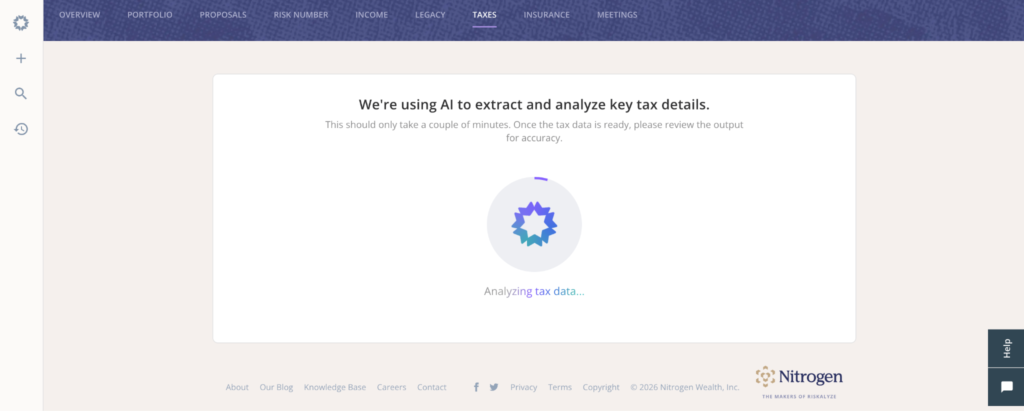
Nucleus in Tax Center. Advisors can now hand Nucleus a client’s tax return the same way they’d hand it a brokerage statement. Nucleus asks for the essentials (filing status, state, birthdate, tax year) and builds the Tax Snapshot in the background. It also helps prep planning scenarios, including Roth conversion analysis, by pulling what it already knows and asking only for what’s missing.
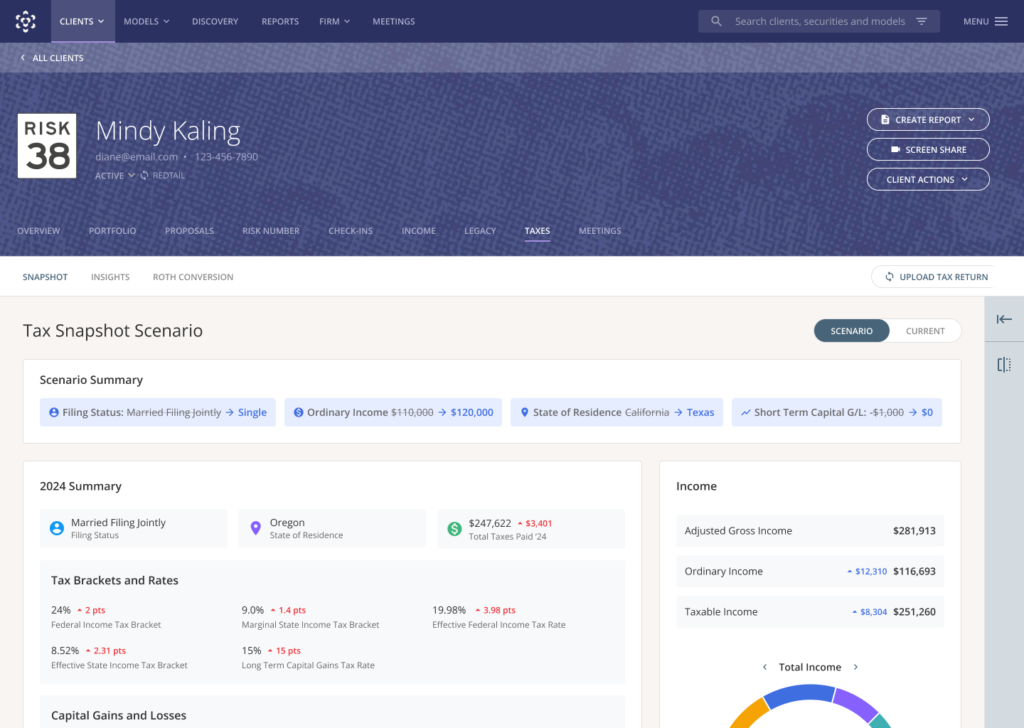
Tax Scenarios adds State Taxes. When a client asks, “What would happen if we moved to Tennessee?” the advisor can now answer with their client’s actual tax return, not just the federal half of the picture. The engine rebuilds state taxable income from real 1040 line items, state by state, accounting for how each state treats Social Security, retirement income, and capital gains.
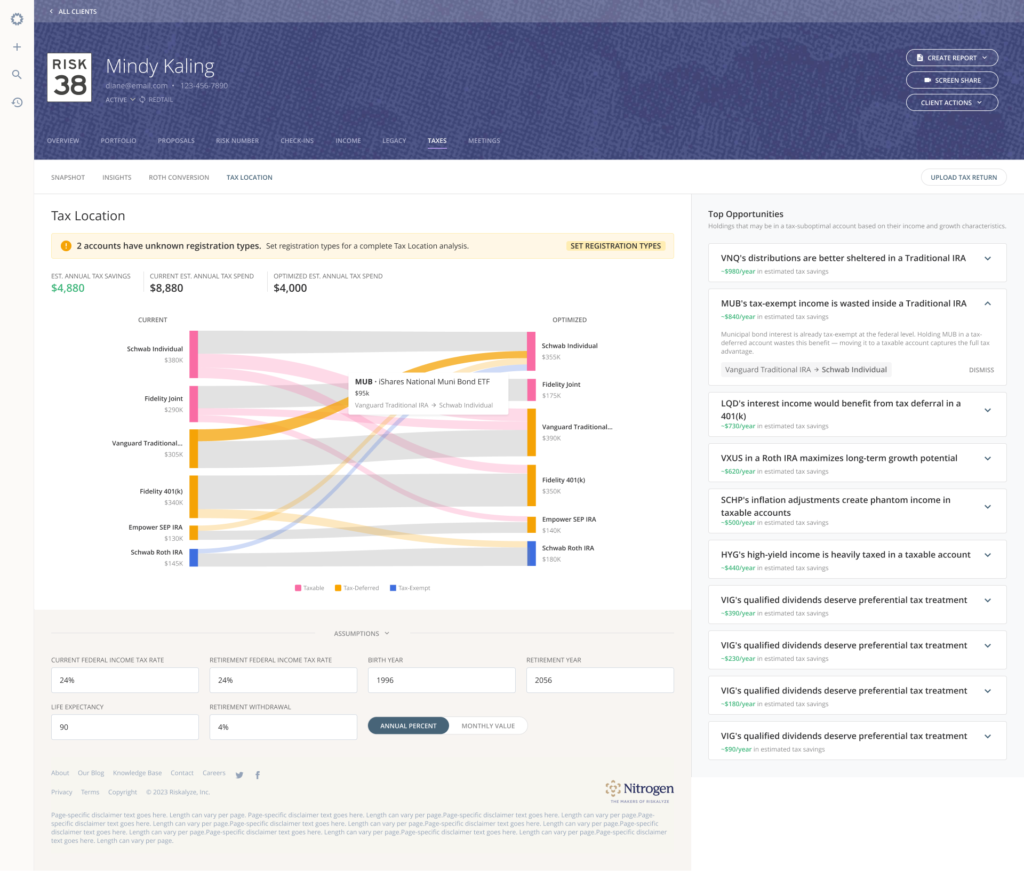
Tax Location surfaces where a client’s investments could work harder across taxable, tax-deferred, and tax-exempt accounts, and flags specific holdings that may be sitting in the wrong place. Every recommendation comes from a documented, rules-based methodology, not AI improvisation, and Nucleus can now surface these opportunities ahead of a client meeting.
Also new this release
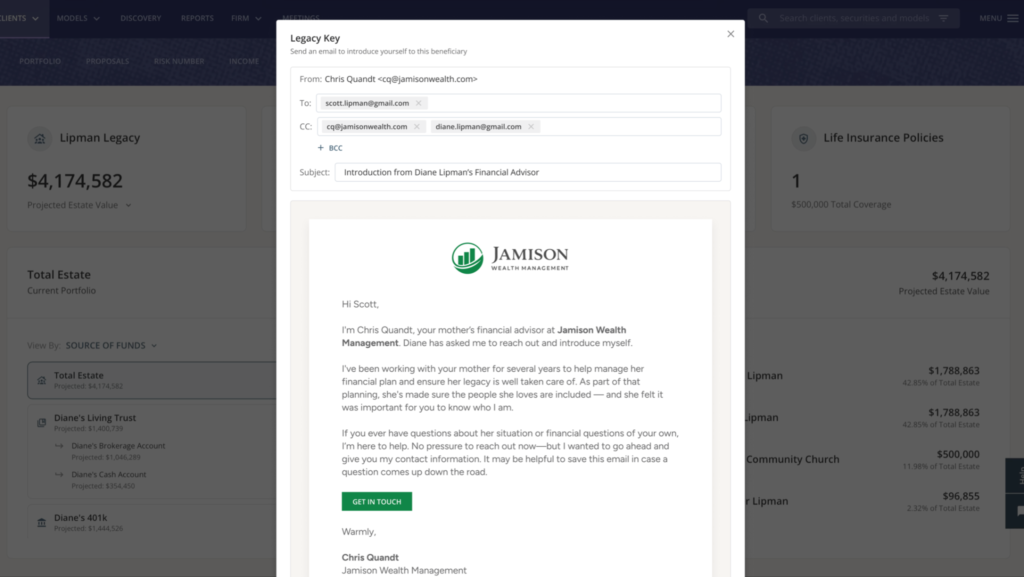
Legacy Keys are now live for every Legacy Center user, giving advisors a formal, firm-branded way to introduce themselves to a client’s beneficiaries with the client’s blessing. With Legacy Center and Tax Center now both part of Nitrogen Complete, Complete has overtaken Elite as Nitrogen’s most popular plan for the first time.
Risk Center and Research Center picked up a long list of enhancements too, including fresher annuity data, more robust account registration types, a smoother Orion integration, and Partner Store models now searchable directly in Discovery as a first-class security type.
Introducing Insurance Center and the Coverage Number™
Every product Nitrogen has built exists to give advisors a way into a conversation that matters. The Risk Number gave advisors a way into the risk conversation. Retirement illustrations opened up the income conversation. Tax Center did it for taxes, Legacy Center for the next generation.
Insurance was the conversation still missing a number.
More than 100 million Americans are underinsured or carry no life insurance at all, and roughly 11,000 people turn 65 every day, stepping into greater longevity and long-term care risk. Advisors have wanted to bring insurance into the conversation, but between disconnected calculators and complicated illustrations, it’s been hard to make the conversation feel like anything other than a sales pitch.
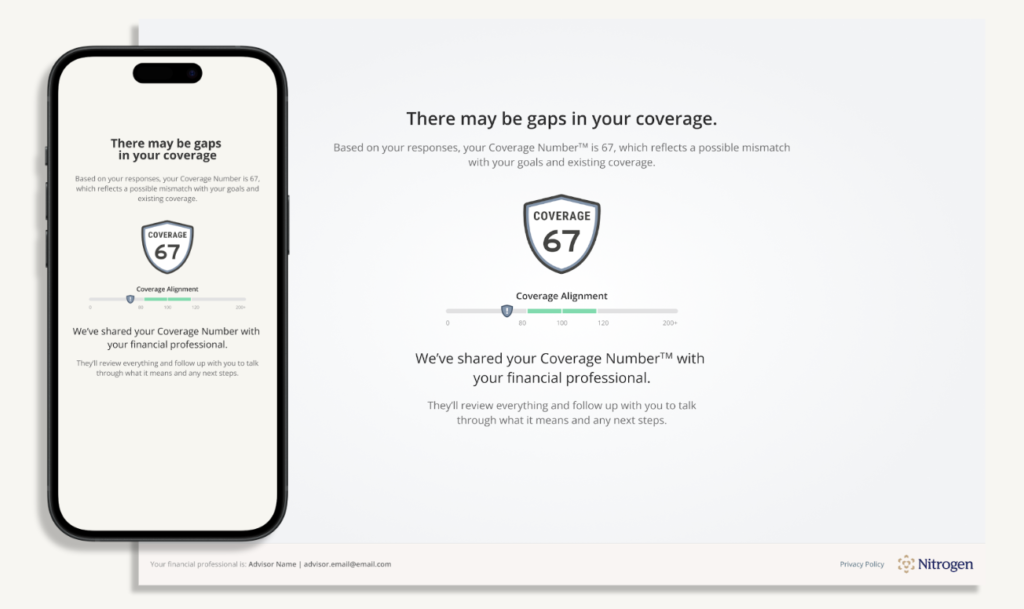
Insurance Center changes that. It’s anchored by the Coverage Number™, a single figure that compares a client’s existing coverage against their calculated need, on the same familiar scale advisors already know from the Risk Number: below 100 may signal a gap, above 100 may point to excess coverage, and 80 to 120 is generally on track. It’s built on benchmarks advisors already trust, including the DIME framework for life insurance and the Genworth/CareScout Cost of Care Survey for long-term care.
Two stories from the launch demo show why it matters:
Michael and Jen Parker have two kids, a mortgage, and a $250,000 term policy from years ago they haven’t thought about since. Their Coverage Number came back low. Once they could see it, the advisor could show them exactly what a right-sized life insurance and long-term care plan would look like, and watch the number climb toward target in real time.
Clare, 61, kids launched and mortgage paid off, had the opposite problem: three term policies and a Coverage Number that ran too high. She wasn’t underprotected. She was overpaying for coverage she no longer needed. Her advisor used Insurance Center to show her exactly where she could redirect that money instead, including a Retirement Income Coverage score that shows what percentage of her essential spending would still hold up if a downturn hit on day one of retirement.
That’s the range Insurance Center is built for: it tells advisors the truth in both directions, gap or excess, and gives them a defensible, best-interest starting point either way. Long-term care events now also model directly into Income Center’s Retirement Maps, so advisors can show clients the difference an LTC event makes with and without coverage in place.
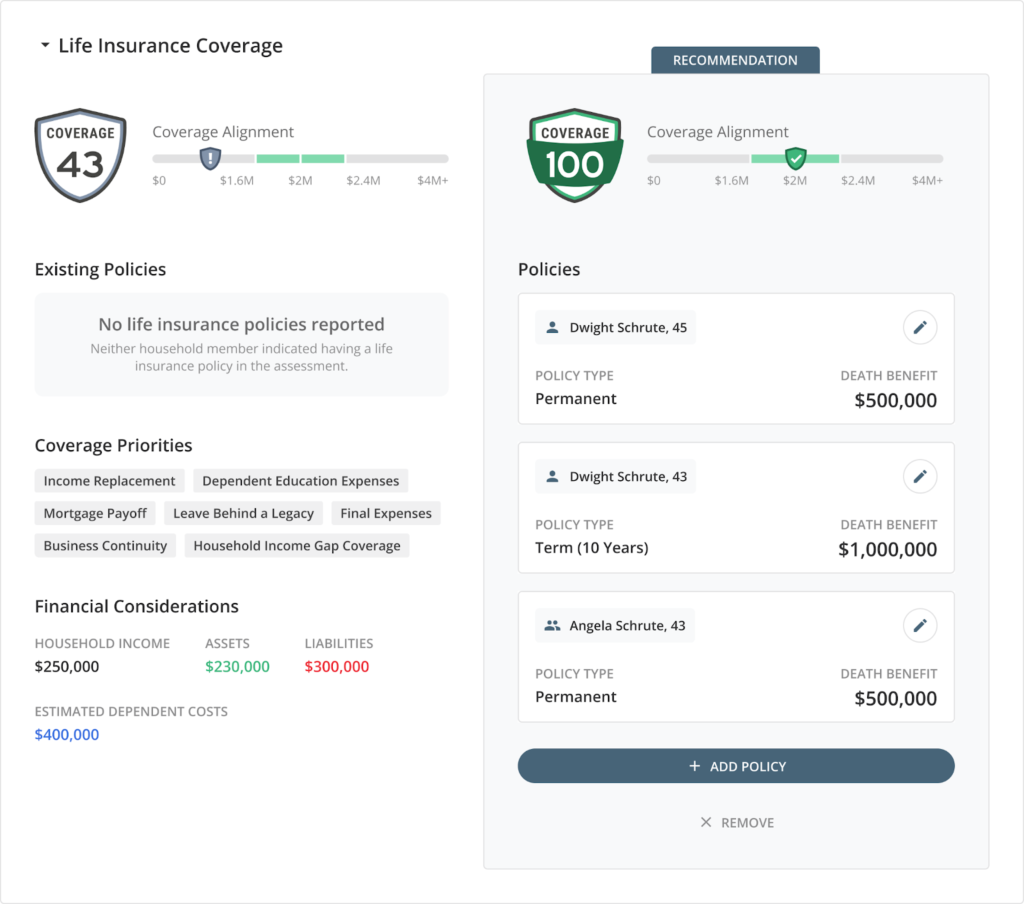
Insurance Center is available now, on its own for a promotional price of $79 a month or included at no extra cost in Nitrogen Complete, which now bundles Risk Center, Research Center, Income Center, Tax Center, Legacy Center, and Insurance Center in one plan.
Create more Catalyst Moments with Nitrogen
This release gives advisors more ways to show clients what their advisor already sees, and Insurance Center gives them a way into a conversation that’s been missing a clear starting point for far too long.
Book a demo to see everything from this release, including Insurance Center, in action.
FAQ
What is Insurance Center?
Insurance Center is Nitrogen’s latest tool for assessing a client’s life insurance, long-term care, and retirement income coverage. It’s anchored by the Coverage Number™, which compares a client’s existing coverage against their calculated need and gives advisors a clear, quantitative starting point for the insurance conversation.
How does the Coverage Number work?
The Coverage Number™ compares a client’s existing insurance coverage against their calculated need. A score below 100 may indicate a potential coverage gap, a score above 100 may indicate excess coverage, and scores between 80 and 120 are generally considered on track. It currently covers life insurance, long-term care, and retirement income.
Is the Coverage Number calculated using AI?
No. The Coverage Number is calculated using a deterministic, rules-based methodology built on established benchmarks, including the DIME framework for life insurance and the Genworth/CareScout Cost of Care Survey for long-term care. It uses fixed formulas and standardized assumptions, not AI or machine learning.
How much does Insurance Center cost?
Insurance Center is available as a standalone plan starting at promotional pricing of $79 a month, as an add-on to other Nitrogen products, or included at no additional cost in Nitrogen Complete.
What is Nitrogen Complete?
Nitrogen Complete is Nitrogen’s all-in-one plan, bundling Risk Center, Research Center, Income Center, Tax Center, Legacy Center, and Insurance Center. With the addition of Insurance Center, Complete has become Nitrogen’s most popular plan.
What is Nucleus?
Nucleus is Nitrogen’s AI agent for advisors. It can take action across the suite to help build portfolios from statements, prepare proposals, generate Retirement Maps, and now work directly with tax returns and Insurance Center data. Nucleus asks for confirmation before committing any action.
Does Nitrogen integrate with Charles Schwab?
Yes. Nucleus Account Opening launches with Schwab as Nitrogen’s first account-opening partner. Nucleus pre-fills account-opening details from information already in Nitrogen, and once an account is opened, Nitrogen reconciles it automatically with no duplicate entry required. Rollout begins with eligible shared customers this fall.
What is Tax Location?
Tax Location is a Tax Center feature that reviews where a client’s investments sit across taxable, tax-deferred, and tax-exempt accounts and surfaces holdings that may be in the wrong place. Recommendations come from a documented, rules-based methodology.
Does Tax Scenarios support state taxes?
Yes. Tax Scenarios now includes State Taxes, letting advisors model the tax impact of a client moving to a different state using the client’s actual 1040 line items, rather than federal estimates alone.
What else was announced at the Summer Product Launch?
Legacy Keys are now available to every Legacy Center user. Tax Center added Nucleus-assisted returns, State Taxes in Tax Scenarios, and Tax Location. Nucleus is now available in Slack, Microsoft Teams, and through Nitrogen MCP.