
Behind Insurance Center: Building a Better Way to Start the Insurance Conversation

Insurance can be one of the hardest subjects for an advisor to raise.

It touches on death, disability, caregiving, retirement, and what might happen to a family when life does not go according to plan. Even clients who know they need insurance may struggle to answer a basic question: Do I have the right amount?

The tools available haven’t made that easier. Most are disconnected, technical, and built around insurance products rather than the person sitting across the table. And advisors who built their careers around investments may also worry that introducing insurance feels like a sales pitch.

These were some of the experiences that were on our mind when we began developing Insurance Center.

Justin Boatman, Nitrogen’s Chief Marketing Officer & Head of Product Strategy, and Jesse Rosato, Chief Technology Officer, led that work. Here’s what they learned along the way, and why they believe insurance awareness belongs in modern financial advice. 

Q: What customer problem led Nitrogen to build Insurance Center?

Jesse Rosato: We know many of the advisors we serve are already helping clients with insurance. We also believe advisors who are not having those conversations often feel like they should be.

The challenge is finding a comfortable way to start. Insurance brings up delicate topics involving death, family, and care. Advisors who come primarily from an investment background may not feel prepared to lead that discussion. Some are also concerned about being perceived as the outdated stereotype of an insurance salesperson.

At the same time, clients have questions. They want their advisor to help them understand whether they have what they need.

Our experience with Risk Number® showed us that a quantitative, client-specific starting point can make a difficult conversation easier. We thought there could be a similar approach for insurance. That led us to begin working on Coverage Number™.

Justin Boatman: There hasn’t been much progress in how advisors talk about insurance with clients. The terminology can feel archaic, and the tools are often separated by insurance type.

That reminded us of how the industry used to discuss investment risk. Advisors had plenty of technical terms, but much of that language didn’t mean anything to the end investor. The Risk Number helped turn that complexity into a discussion that a client could participate in.

We saw an opportunity to do something similar with insurance. Begin with something specific to the client, help them become curious about their coverage, and give the advisor a clearer way into the conversation.

Q: Did personal experience influence how you approached the product?

Rosato: About six months before we started working on Insurance Center, my wife and I went through the process of buying term life insurance. We have young kids, and we were preparing to take a flight without them.

It naturally raised the worst-case question, “If something happened to both of us, would our children be taken care of?”

We worked with an agent we liked, but the process was still daunting. It was difficult to get clarity around what would be enough, what might be too much, and how we could feel confident about the decision.

I came away thinking, “There has to be something we can do to help with this.” That experience stayed in the back of my mind as we began developing the product.

Boatman: My wife and I were shopping for term life insurance around the same time. We had also recently completed our estate planning, so insurance was already part of the conversation at home.

What stood out to me was how much of the process focused on products. It felt like looking at a sheet and choosing among the available options.

My reaction was, “What about me? What is right for my family?” I wanted the conversation to begin with our situation and then move toward a recommendation. That became an important part of how we thought about Insurance Center.

Q: What surprised you during development?

Rosato: I was surprised by how difficult many existing insurance assessments can be from the client’s perspective. Even when the analysis is technically sound, the experience isn’t always friendly or easy to understand.

I was also struck by how easy it is for someone to underestimate their insurance needs.

When people think about replacing income or paying for a child’s education, the numbers can become larger than they expected. The same applies when considering the financial contribution of a stay-at-home parent. Their work has real economic value, but families may not recognize the cost of replacing that work until they walk through the details.

Boatman: I kept expecting to find that somebody had already approached the problem this way.

There is plenty of insurance technology, but much of it’s carrier-specific or designed for a different purpose. We found very little focused on helping an advisor engage a client around overall insurance alignment.

That made the opportunity more interesting. It was no longer just about trying to improve an existing category of advisor software. We were exploring a type of client conversation that technology hadn’t addressed particularly well.

Q: Did any assumptions change as you worked through the methodology?

Rosato: One early assumption was that an insurance assessment could be completed at the household level.

As we worked through different scenarios, it became clear that each person in the household needed to be considered individually. A household might appear to have adequate coverage in total while one spouse has little or no coverage.

The stay-at-home parent is a good example. People may focus on insuring the primary income earner, but the loss of the parent providing childcare and managing the household could create substantial expenses for the surviving spouse.

Looking only at the household total can hide that gap.

Boatman: The cost of long-term care also remained surprising throughout development. Looking at those expenses, and how they can grow over time, reinforces how important it is to begin these conversations before the need becomes immediate.

Q: What was the hardest part of designing Insurance Center?

Rosato: Coverage Number differs from Risk Number in an important way.

There is no wrong Risk Number. It reflects a person’s preferences and comfort with investment risk. Insurance need is more quantitative. Based on the information entered, there may be a gap between the client’s estimated need and current coverage.

We had to find a way to communicate that without making the client feel blamed or judged.

The goal is to create appropriate urgency while preserving confidence in the advisor relationship. A coverage gap should lead to an open dialogue. It shouldn’t make the client feel as though they failed an assessment.

One of the questions we kept returning to was, “How do we share information without making someone feel judged for it?”

Boatman: We also wanted to keep the advisor in the driver’s seat.

Insurance Center should give the advisor a useful framework, not make the decision for them. That influenced our choice to use ranges rather than presenting the result as a pass-or-fail answer.

The advisor knows the client and can apply professional judgment. The technology gives them a clearer way to explain what they see.

Q: How did advisor feedback shape the final product?

Rosato: We met with customers and walked them through early versions of the product. At first, much of what we demonstrated focused on life insurance and long-term care.

The question we consistently heard was, “What about retirement income and annuities?” Those were already part of our thinking, but the response confirmed how important they were to advisors.

That feedback helped reinforce the broader view of the product. Advisors are not looking at one insurance need in isolation. They want to understand how different forms of coverage fit within the client’s financial life.

Boatman: We spoke with advisors about which insurance types should be prioritized, but we also wanted the client experience to remain intuitive.

Our process was essentially to ask advisors what matters, build an experience that would make sense to our own parents, and then bring it back to advisors for testing.

When something is easier for the client to understand, it usually becomes more useful to the advisor as well.

Q: What is the one thing you want advisors to remember about Insurance Center?

Boatman: Every advisor ought to act in the best interest of their clients when it comes to insurance.

That doesn’t mean every advisor needs to sell insurance. It does mean advisors should be aware of how insurance may affect the client’s plan and long-term goals.

Insurance Center is designed to help them begin that exchange.

Bring more clarity to insurance conversations

Insurance needs can be hard to calculate and even harder to raise. Insurance Center gives advisors a client-friendly starting point, with room left for professional judgment and a deeper planning conversation.

Interested in learning more? See how Nitrogen can help your team make complex financial topics easier for clients to understand.

The S&P 500 Fell for a Second Straight Month. Advisors Got More Bullish Anyway.

Markets had a quiet, if slightly negative, July. The S&P 500 slipped for a second consecutive month after a strong first half, a mild pullback rather than a dramatic move. But inside the portfolios advisors were proposing to clients, things were moving.

Each month, Nitrogen analyzes more than 1,000 advisor-generated portfolio proposals per day to see how advisors are responding to changing markets. July’s data offers a look beneath the surface at where advisors were putting client money and how investors were feeling along the way.

Signal 1: Client mood

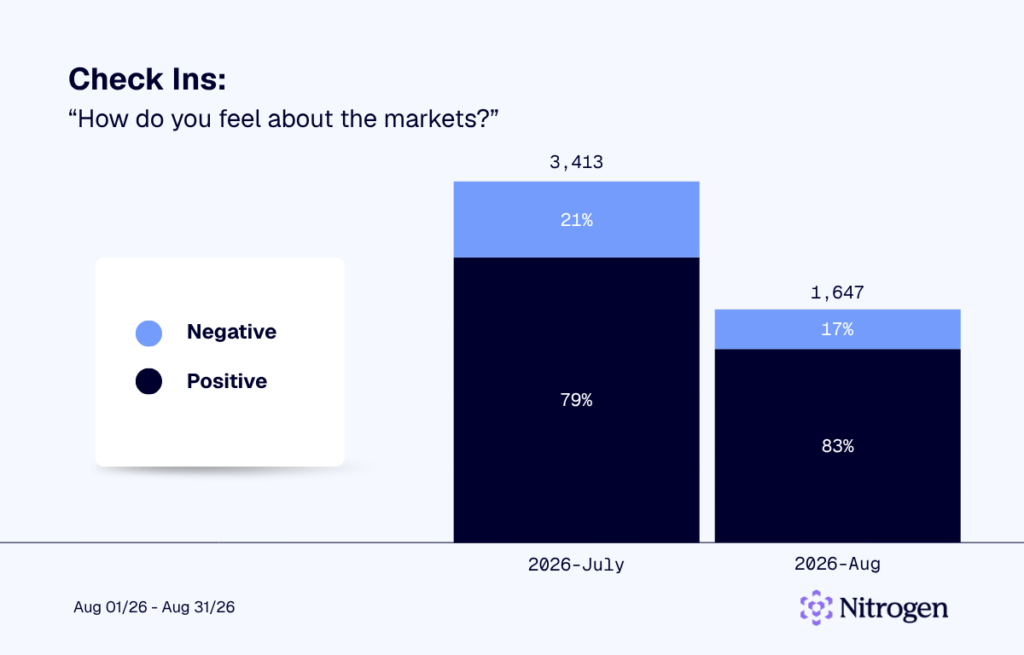
These numbers come from real conversations. Nitrogen sent an average of 769 check-ins to clients each day in July, asking how they felt about markets and their financial future.

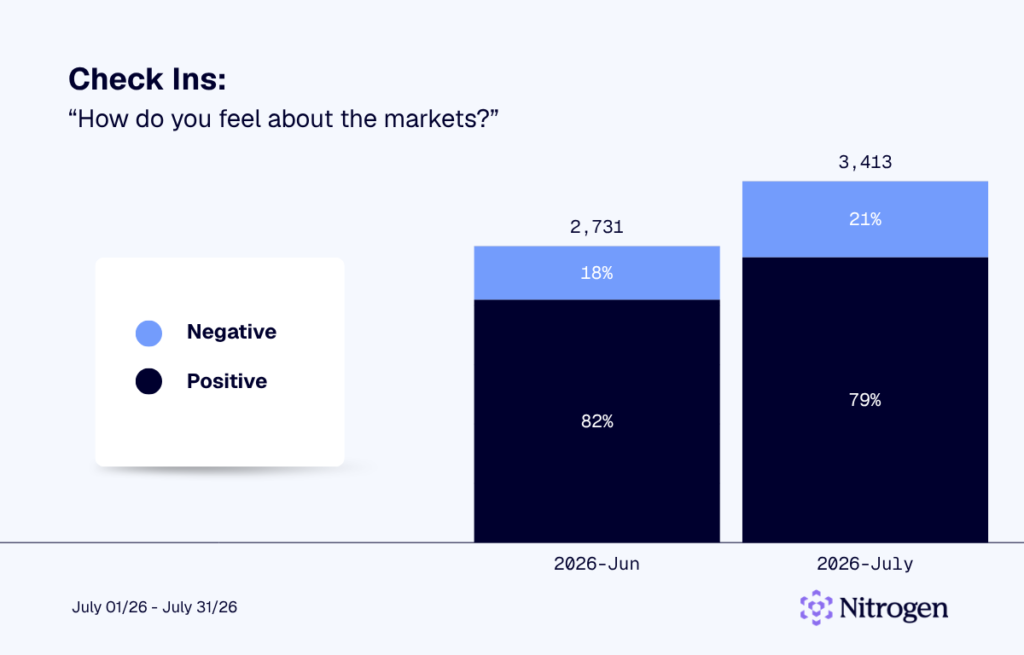
Seventy-nine percent of clients said they felt positive about the markets in July, compared with 82% in June. The three-point decline was modest, leaving nearly four out of five clients with a positive market outlook.

July Check-Ins: How Do You Feel About the Markets?

How do you feel about the markets? graph

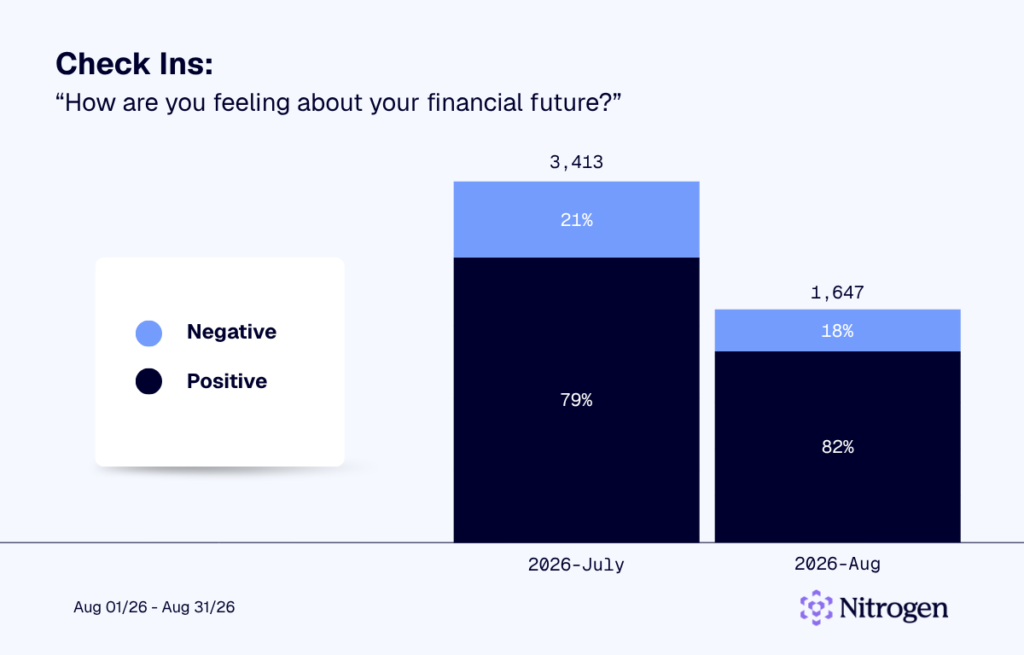
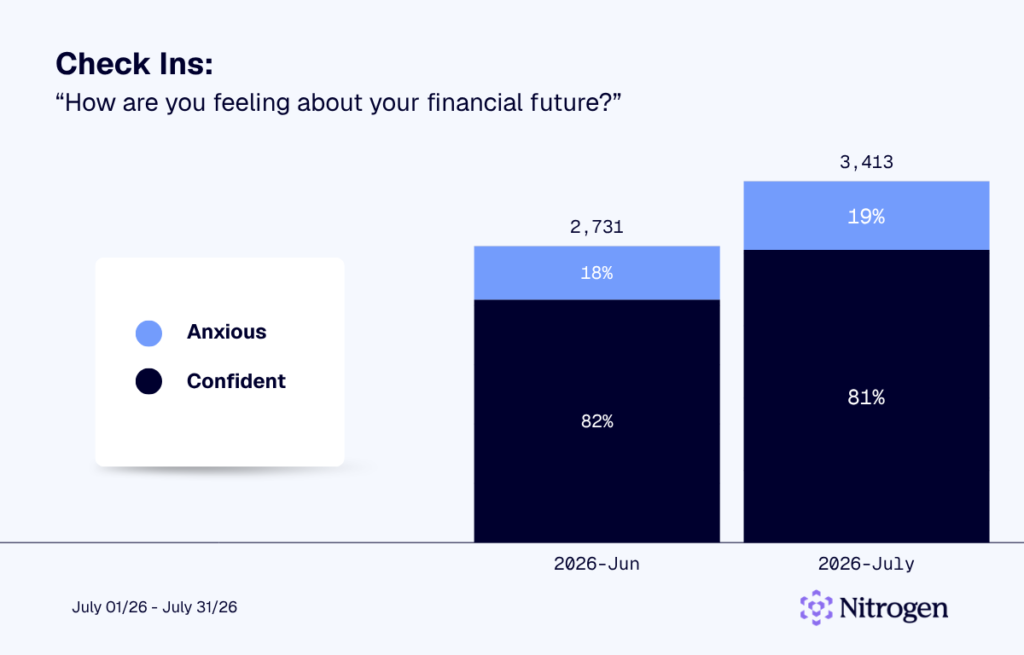
Confidence in personal finances was even steadier. Eighty-one percent of clients said they felt confident about their financial future, down just one percentage point from June.

July Check-Ins: How Are You Feeling About Your Financial Future?

How do you feel about your financial future? chart

The data suggests client sentiment changed very little during a relatively quiet month for markets. Investors remained broadly positive about both the markets and their own financial outlook, continuing the stronger sentiment seen since the spring.

Signal 2: Risk posture

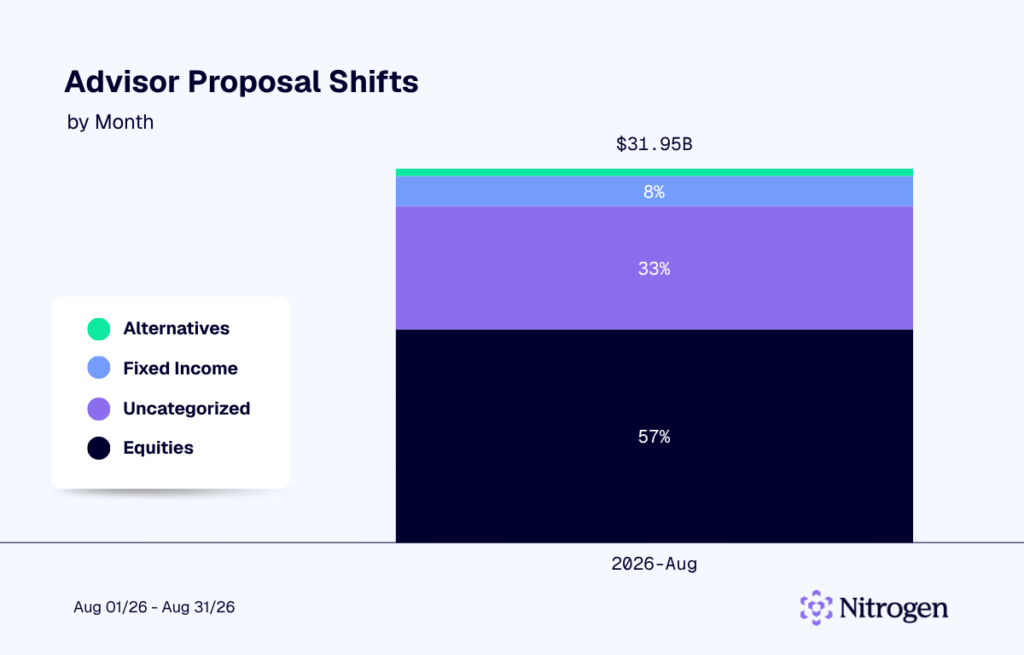
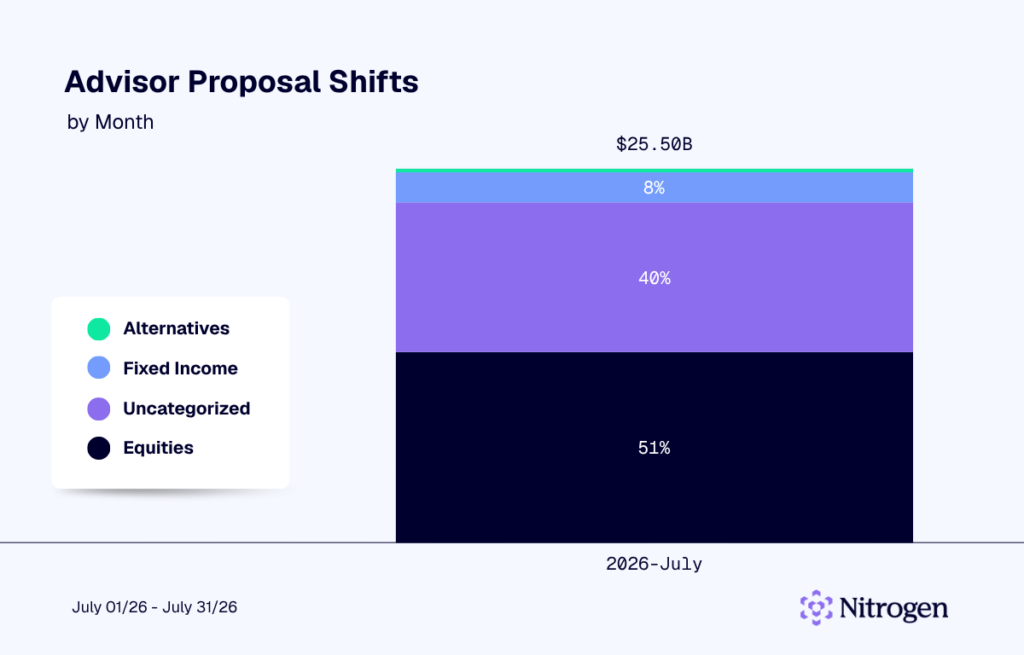
Advisors made a sizable move toward equities in July. Equities accounted for 51% of proposed allocations, up four percentage points from 47% in June. Fixed income held steady at 8%.

July Advisor Proposal Shifts

Proposal Metrics

The increase points to growing confidence in equity markets among advisors. Even with the S&P 500 posting a second straight monthly decline, advisors showed a greater willingness to participate in equities.

Signal 3: Liquidity positioning

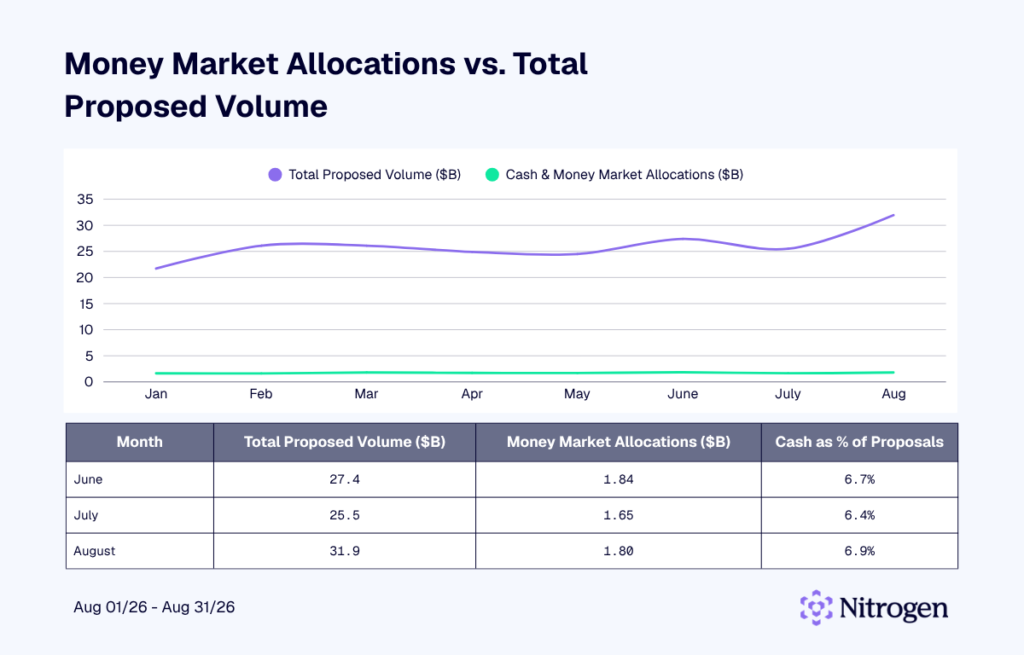
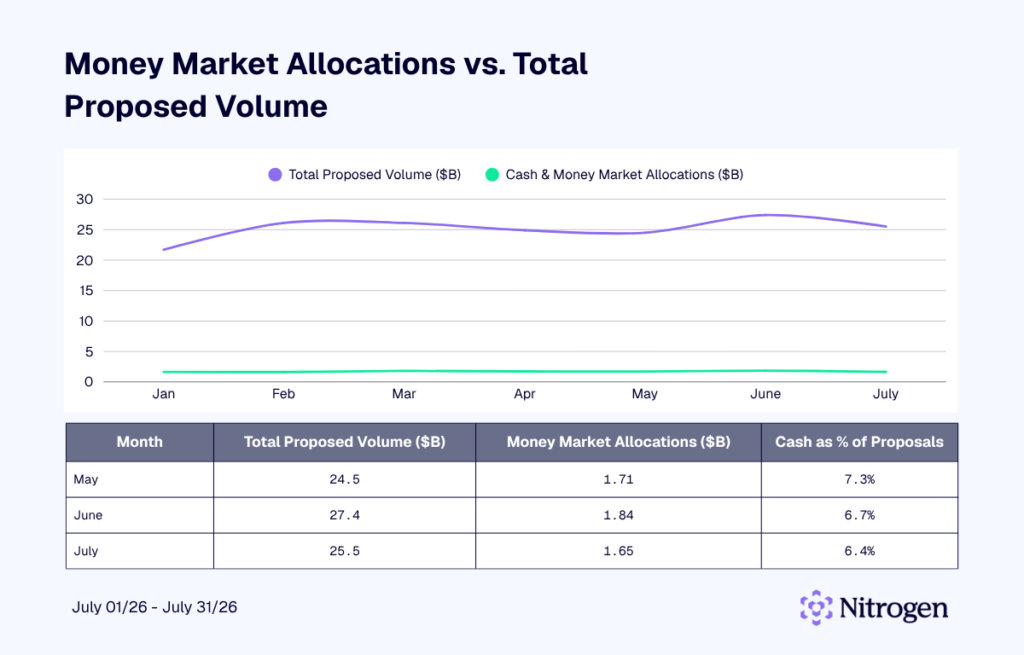
Cash and money market allocations fell to 6.4% of proposed volume in July, down from 6.7% in June. The decline marked the second consecutive month that advisors reduced their cash positioning.

Liquidity Positioning

The move reinforces the bullish signal coming from equity allocations. Advisors kept less money on the sidelines while increasing their exposure to stocks. Cash remained a meaningful part of proposed portfolios, but July’s positioning showed a greater willingness to put capital to work.

Signal 4: Advisor activity

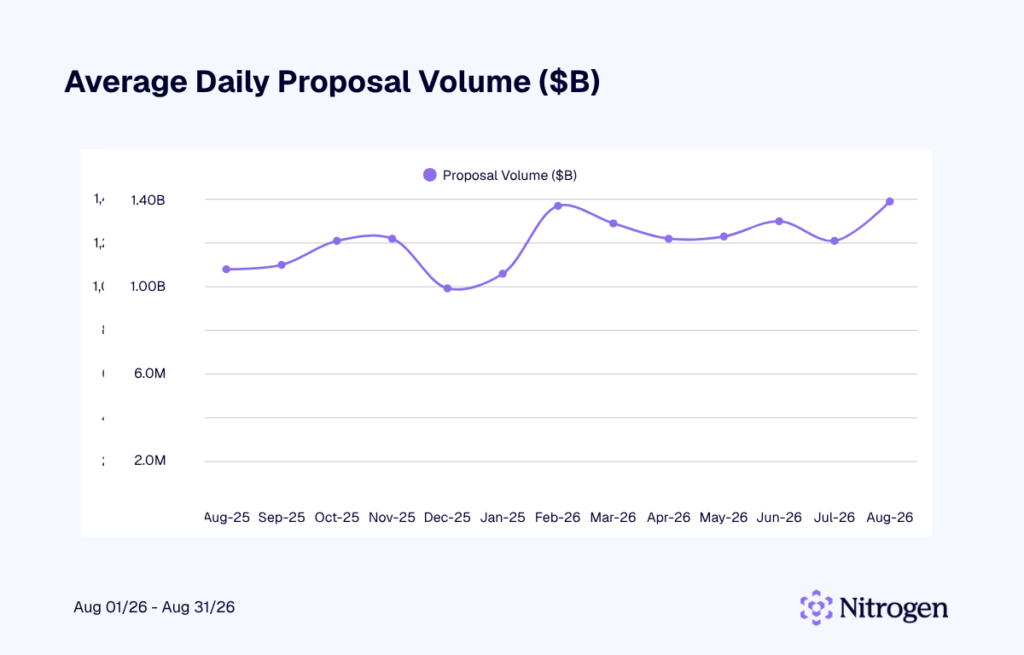
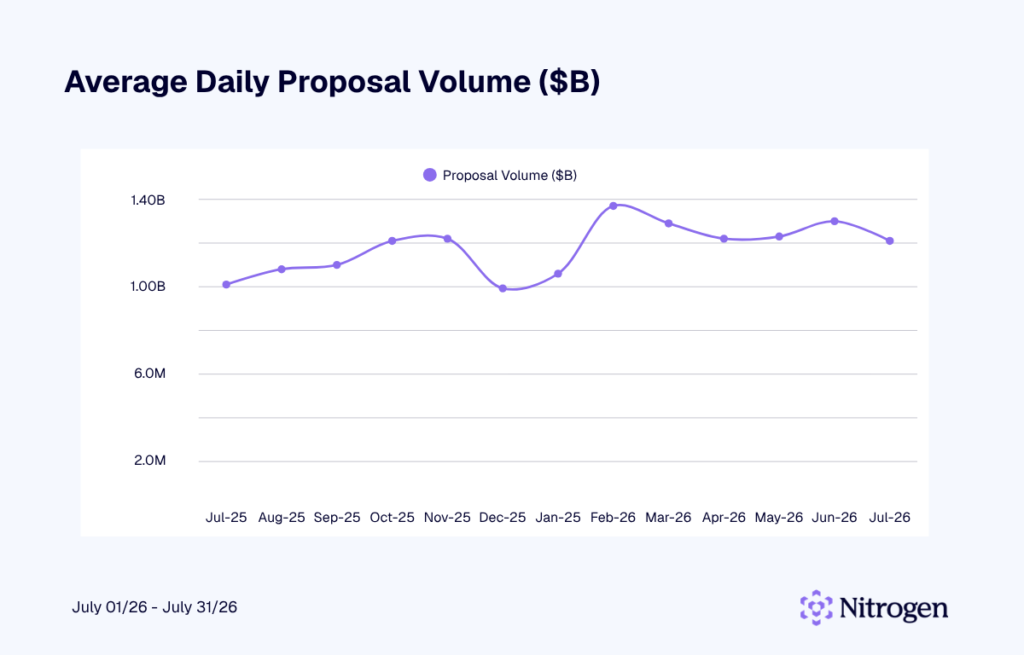
Average daily proposal volume declined to $1.21 billion in July from $1.30 billion in June. Advisors generated an average of roughly 1,080 proposals per day, also down from the previous month.

July Average Daily Proposal Volume

Average Daily Proposal Volume

The slowdown came during the heart of summer, when vacations and lighter client calendars can naturally reduce proposal activity. July’s volume remained within the range seen over the past year, pointing to a normal seasonal slowdown rather than an unusual drop in advisor activity. 

Signal 5: Concentration

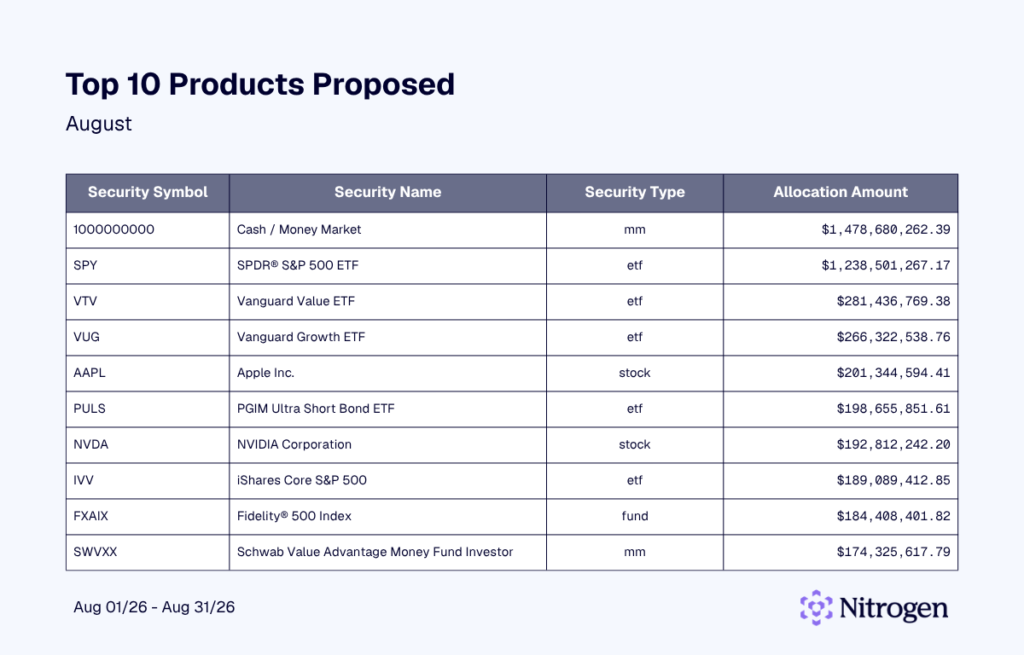
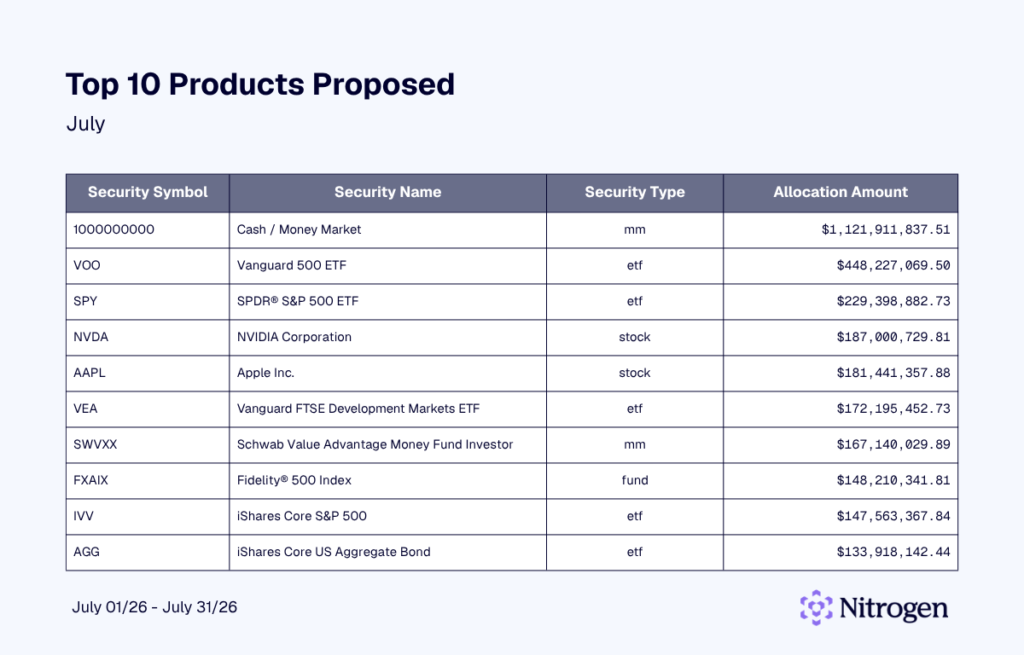
July’s most frequently proposed investments looked remarkably similar to June. Nine of the top 10 products appeared in both months. The Vanguard S&P 500 ETF (VOO) climbed from ninth to second on the list, while Nvidia moved from eighth to fourth.

July Top Products Proposed

Top 10 Products Proposed - July

The Vanguard FTSE Developed Markets ETF (VEA) was the only new addition to the top 10, replacing iShares Russell 3000 ETF (IWV). The fund provides broad exposure to developed equity markets outside the U.S. Its appearance may reflect growing advisor interest in international diversification as opportunities outside U.S. markets attract more attention.

What a Quiet Month Can Tell Us

Big market moves tend to make portfolio decisions easier to explain. When stocks sell off sharply or surge, there’s an obvious backdrop for whatever advisors do next.

July offered fewer obvious cues.

The S&P 500’s second straight monthly decline was mild, not the kind of move that forces a portfolio conversation. Yet Nitrogen’s proposal data continued to move beneath the surface. In a month without a major market swing driving the conversation, those changes offer an interesting glimpse into where advisors were comfortable positioning client portfolios.

Sometimes the quieter months give us more room to see what advisors are thinking.

See how advisors use Nitrogen data and Risk Number® insights to guide client conversations through changing markets. Book a demo today.

About Nitrogen Signals & Shifts

Each month, Nitrogen analyzes proposal and sentiment data from across its platform to help advisors understand what’s driving client decisions. With more than 1,000 proposals created daily, these insights highlight how advisors adapt and how investors stay invested.

Thank you for reading this edition of Nitrogen Signals & Shifts. The next issue will be published in September. Subscribe at the top of this post so you never miss an update.

Summer 2026 Product Launch: Introducing Insurance Center and the Coverage Number™

Our Summer 2026 Product Launch was the highest turnout of any product launch event we’ve hosted. The reaction says why: this release includes the biggest addition to the Nitrogen suite since the Risk Number® itself.

In this release, we showcased the enhancements and new releases to drive more Catalyst Moments: the point where an advisor helps a client see something important about their financial life more clearly, opening the door to what happens next. For years, that’s meant risk and retirement conversations. Then tax and legacy planning. This release adds Nucleus in more places, an enhanced Tax Center, and a brand-new product built around an entirely new metric. 

Here’s everything that shipped, ending with the announcement advisors have been asking us about ever since the event ended.

Nucleus goes everywhere advisors work

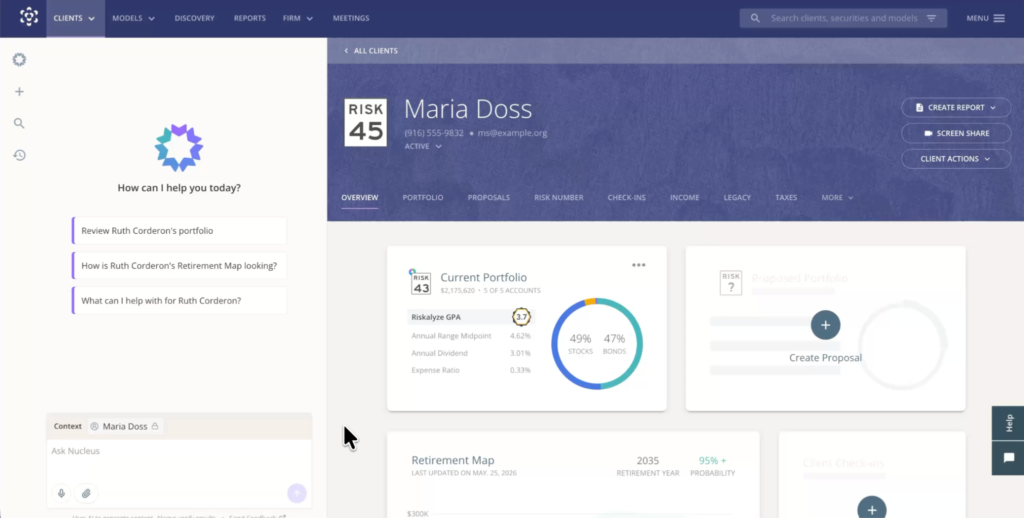
Earlier this year, we introduced Nucleus, Nitrogen’s AI agent for advisors. Since then it’s become part of daily workflows, turning statements into portfolios and building client-ready deliverables. Until now, most of that work started from the client profile. This summer, Nucleus expands across the entire suite.

Nucleus chat, Nitrogen dashboard

Advisors can now start a conversation with Nucleus before ever attaching a client, then bring client context in when the moment calls for it, without losing the thread. Say an advisor is researching investments in Discovery. They can work with Nucleus without mentioning a client, then pull a specific client into the same conversation the moment an idea clicks. Searchable chat history makes it easy to pick that thread back up later.

Nucleus also reaches beyond Nitrogen’s platform. Advisors can bring permissioned Nitrogen information into Slack and Microsoft Teams, and connect Nucleus to ChatGPT and Claude. Nitrogen MCP extends that access further, letting firms build their own AI agents on top of Nitrogen.

Nitrogen MCP icons

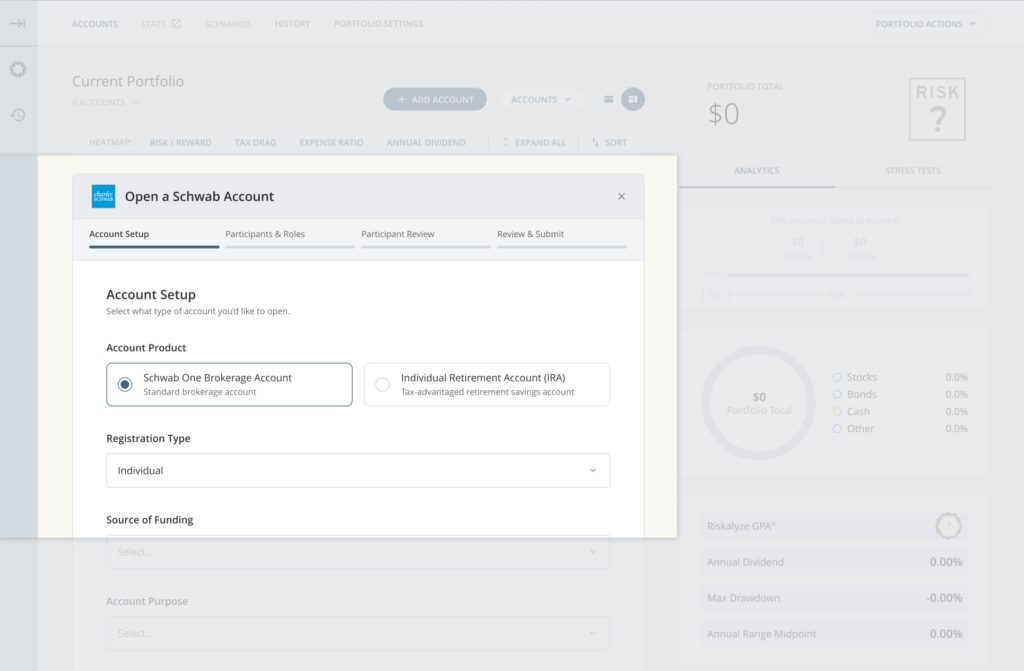
And when a proposal turns into new business, Nucleus can carry that work forward. Nucleus Account Opening with Schwab launched, and Nitrogen is among the first platform anywhere to showcase Schwab’s new account-opening APIs. Nucleus pre-fills account-opening details from information already in Nitrogen, the advisor reviews and submits without leaving Nitrogen, and a pending account shows up right in the client’s portfolio to track status. Once Schwab completes the account, it reconciles automatically, no duplicate entry required. Rollout begins with eligible shared customers this fall, ahead of Schwab’s Impact event.

Open a Schwab Account

The result: less manual work, less re-entry, and more time for the conversations and follow-up that actually grow a practice.

Tax Center gets three big upgrades

Tax Center is already Nitrogen’s fastest-growing product, and this release moves it forward on three fronts.

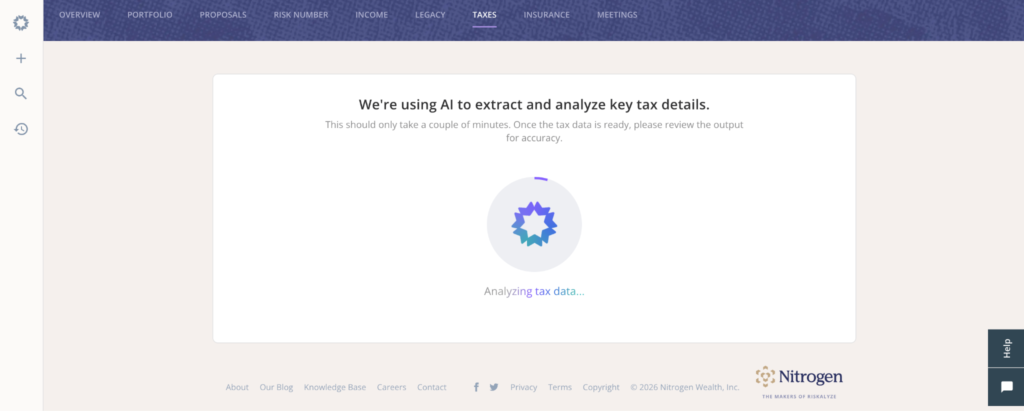
Nucleus in Tax Center. Advisors can now hand Nucleus a client’s tax return the same way they’d hand it a brokerage statement. Nucleus asks for the essentials (filing status, state, birthdate, tax year) and builds the Tax Snapshot in the background. It also helps prep planning scenarios, including Roth conversion analysis, by pulling what it already knows and asking only for what’s missing.

Tax Center and Nucleus

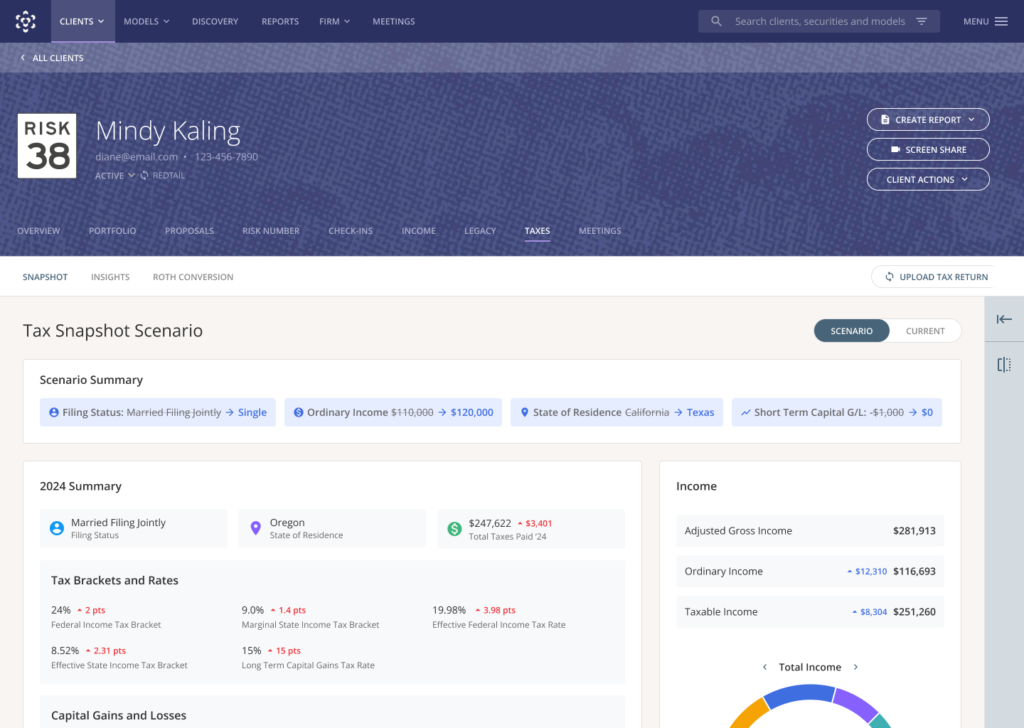
Tax Scenarios adds State Taxes. When a client asks, “What would happen if we moved to Tennessee?” the advisor can now answer with their client’s actual tax return, not just the federal half of the picture. The engine rebuilds state taxable income from real 1040 line items, state by state, accounting for how each state treats Social Security, retirement income, and capital gains.

Tax Snapshot Scenarios

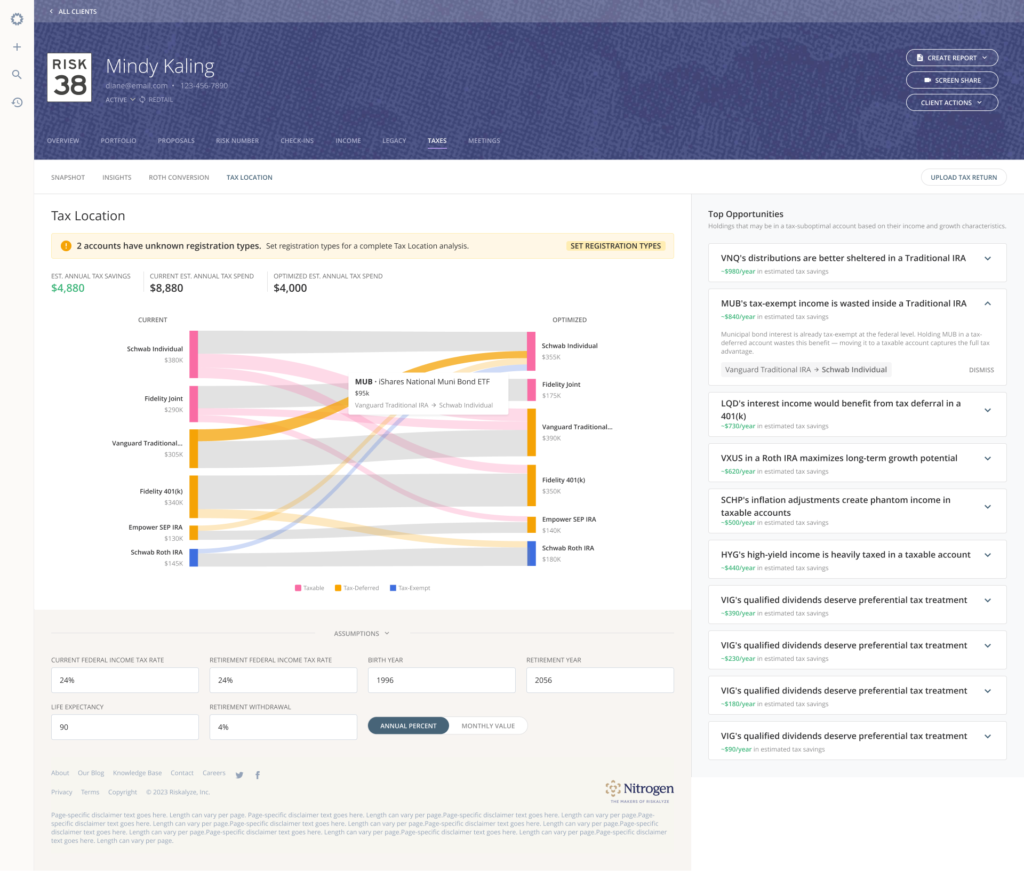
Tax Location surfaces where a client’s investments could work harder across taxable, tax-deferred, and tax-exempt accounts, and flags specific holdings that may be sitting in the wrong place. Every recommendation comes from a documented, rules-based methodology, not AI improvisation, and Nucleus can now surface these opportunities ahead of a client meeting.

Tax Center and Tax Locations

Also new this release

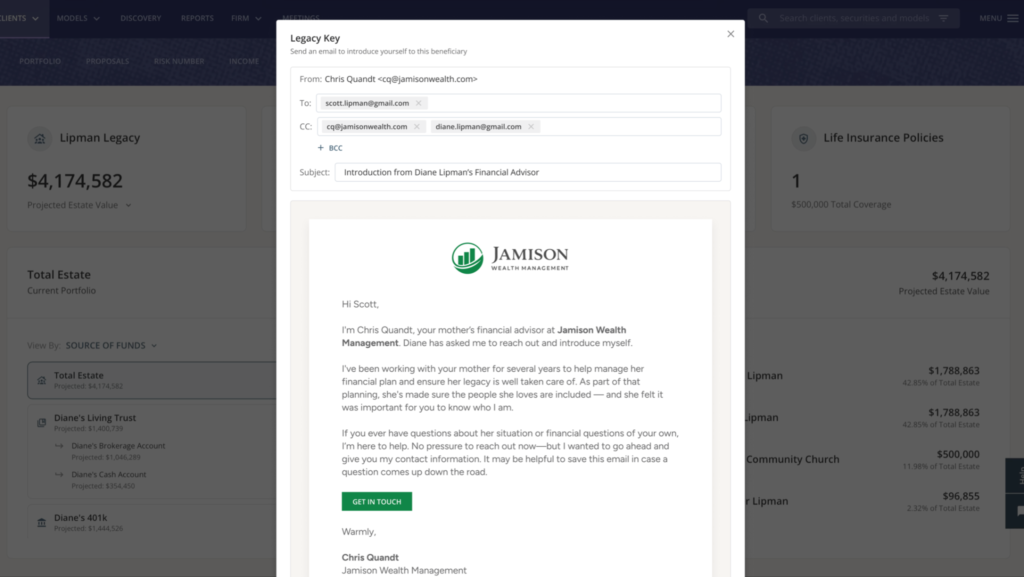
Legacy Keys are now live for every Legacy Center user, giving advisors a formal, firm-branded way to introduce themselves to a client’s beneficiaries with the client’s blessing. With Legacy Center and Tax Center now both part of Nitrogen Complete, Complete has overtaken Elite as Nitrogen’s most popular plan for the first time.

Legacy Keys

Risk Center and Research Center picked up a long list of enhancements too, including fresher annuity data, more robust account registration types, a smoother Orion integration, and Partner Store models now searchable directly in Discovery as a first-class security type.

Introducing Insurance Center and the Coverage Number™

Every product Nitrogen has built exists to give advisors a way into a conversation that matters. The Risk Number gave advisors a way into the risk conversation. Retirement illustrations opened up the income conversation. Tax Center did it for taxes, Legacy Center for the next generation.

Insurance was the conversation still missing a number.

More than 100 million Americans are underinsured or carry no life insurance at all, and roughly 11,000 people turn 65 every day, stepping into greater longevity and long-term care risk. Advisors have wanted to bring insurance into the conversation, but between disconnected calculators and complicated illustrations, it’s been hard to make the conversation feel like anything other than a sales pitch.

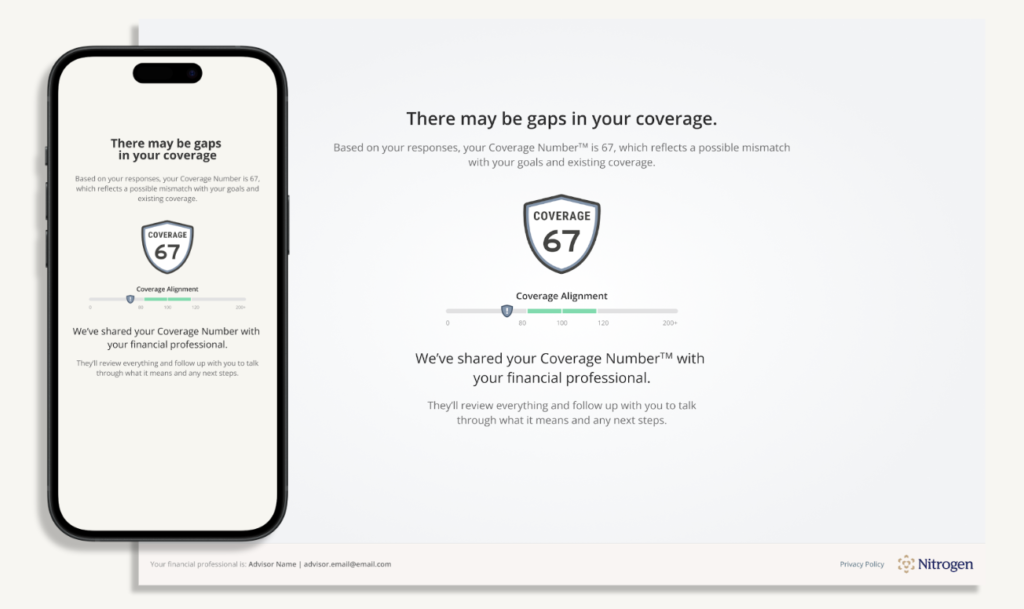
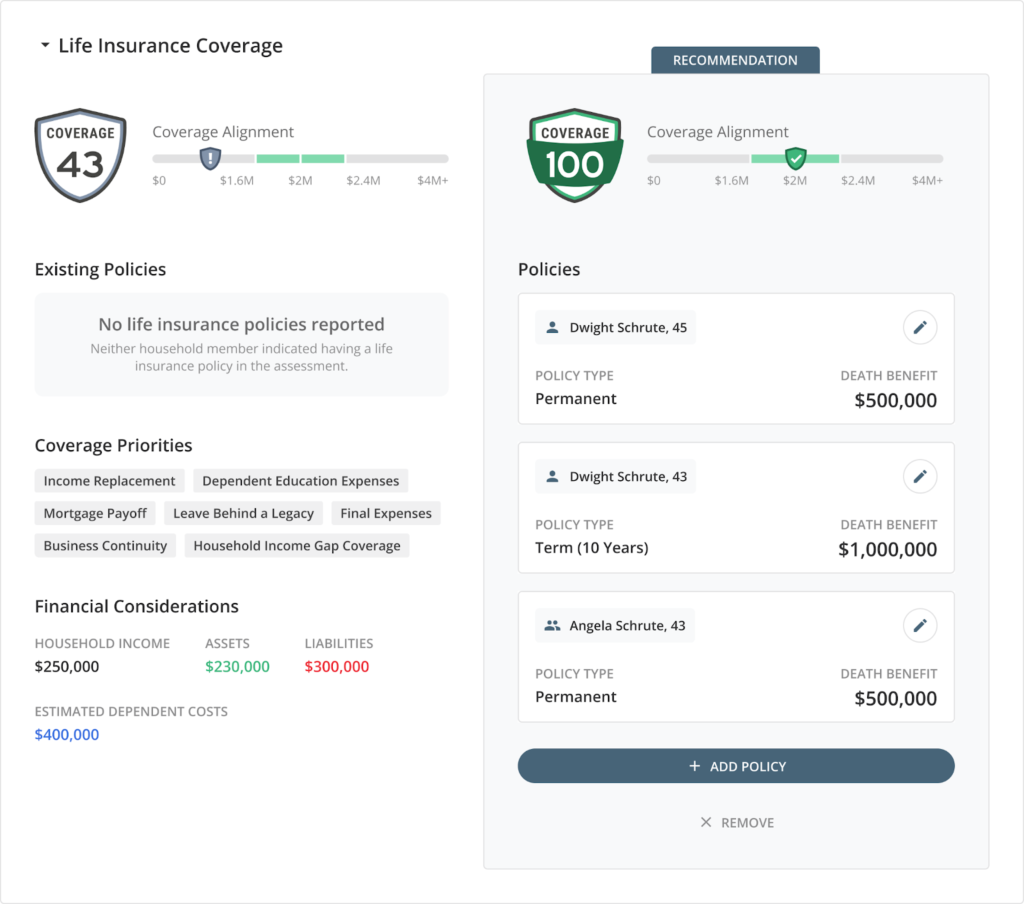
Insurance Center changes that. It’s anchored by the Coverage Number™, a single figure that compares a client’s existing coverage against their calculated need, on the same familiar scale advisors already know from the Risk Number: below 100 may signal a gap, above 100 may point to excess coverage, and 80 to 120 is generally on track. It’s built on benchmarks advisors already trust, including the DIME framework for life insurance and the Genworth/CareScout Cost of Care Survey for long-term care.

Insurance Center

Two stories from the launch demo show why it matters:

Michael and Jen Parker have two kids, a mortgage, and a $250,000 term policy from years ago they haven’t thought about since. Their Coverage Number came back low. Once they could see it, the advisor could show them exactly what a right-sized life insurance and long-term care plan would look like, and watch the number climb toward target in real time.

Clare, 61, kids launched and mortgage paid off, had the opposite problem: three term policies and a Coverage Number that ran too high. She wasn’t underprotected. She was overpaying for coverage she no longer needed. Her advisor used Insurance Center to show her exactly where she could redirect that money instead, including a Retirement Income Coverage score that shows what percentage of her essential spending would still hold up if a downturn hit on day one of retirement.

That’s the range Insurance Center is built for: it tells advisors the truth in both directions, gap or excess, and gives them a defensible, best-interest starting point either way. Long-term care events now also model directly into Income Center’s Retirement Maps, so advisors can show clients the difference an LTC event makes with and without coverage in place.

Insurance Center and Coverage Number

Insurance Center is available now, on its own for a promotional price of $79 a month or included at no extra cost in Nitrogen Complete, which now bundles Risk Center, Research Center, Income Center, Tax Center, Legacy Center, and Insurance Center in one plan.

Create more Catalyst Moments with Nitrogen

This release gives advisors more ways to show clients what their advisor already sees, and Insurance Center gives them a way into a conversation that’s been missing a clear starting point for far too long.

Book a demo to see everything from this release, including Insurance Center, in action.


FAQ

What is Insurance Center?

Insurance Center is Nitrogen’s latest tool for assessing a client’s life insurance, long-term care, and retirement income coverage. It’s anchored by the Coverage Number™, which compares a client’s existing coverage against their calculated need and gives advisors a clear, quantitative starting point for the insurance conversation.

How does the Coverage Number work?

The Coverage Number™ compares a client’s existing insurance coverage against their calculated need. A score below 100 may indicate a potential coverage gap, a score above 100 may indicate excess coverage, and scores between 80 and 120 are generally considered on track. It currently covers life insurance, long-term care, and retirement income.

Is the Coverage Number calculated using AI?

No. The Coverage Number is calculated using a deterministic, rules-based methodology built on established benchmarks, including the DIME framework for life insurance and the Genworth/CareScout Cost of Care Survey for long-term care. It uses fixed formulas and standardized assumptions, not AI or machine learning.

How much does Insurance Center cost?

Insurance Center is available as a standalone plan starting at promotional pricing of $79 a month, as an add-on to other Nitrogen products, or included at no additional cost in Nitrogen Complete.

What is Nitrogen Complete?

Nitrogen Complete is Nitrogen’s all-in-one plan, bundling Risk Center, Research Center, Income Center, Tax Center, Legacy Center, and Insurance Center. With the addition of Insurance Center, Complete has become Nitrogen’s most popular plan.

What is Nucleus?

Nucleus is Nitrogen’s AI agent for advisors. It can take action across the suite to help build portfolios from statements, prepare proposals, generate Retirement Maps, and now work directly with tax returns and Insurance Center data. Nucleus asks for confirmation before committing any action.

Does Nitrogen integrate with Charles Schwab?

Yes. Nucleus Account Opening launches with Schwab as Nitrogen’s first account-opening partner. Nucleus pre-fills account-opening details from information already in Nitrogen, and once an account is opened, Nitrogen reconciles it automatically with no duplicate entry required. Rollout begins with eligible shared customers this fall.

What is Tax Location?

Tax Location is a Tax Center feature that reviews where a client’s investments sit across taxable, tax-deferred, and tax-exempt accounts and surfaces holdings that may be in the wrong place. Recommendations come from a documented, rules-based methodology.

Does Tax Scenarios support state taxes?

Yes. Tax Scenarios now includes State Taxes, letting advisors model the tax impact of a client moving to a different state using the client’s actual 1040 line items, rather than federal estimates alone.

What else was announced at the Summer Product Launch?

Legacy Keys are now available to every Legacy Center user. Tax Center added Nucleus-assisted returns, State Taxes in Tax Scenarios, and Tax Location. Nucleus is now available in Slack, Microsoft Teams, and through Nitrogen MCP.

How Legacy Center Helps Advisors Build Multigenerational Client Relationships

Many advisors spend decades earning a client’s trust. But when wealth transfers to the next generation, there’s no guarantee that relationship will transfer with it.

Legacy planning gives advisors a chance to change that. By bringing beneficiaries into the conversation before assets change hands, advisors can begin building familiarity long before an inheritance becomes a reality.

That’s one of the reasons we introduced Legacy Center, Nitrogen’s newest tool for multigenerational planning. This new feature helps advisors have more meaningful estate conversations, engage the next generation, and create a stronger experience for the families they serve.

To help advisors get started, we recently hosted a webinar demonstrating how Legacy Center fits into a client review meeting. The session focused on three practical workflows advisors can begin using right away, along with a few tips for getting the most from the new product.

Want to see the complete walkthrough? Check out the full webinar on-demand here.

Start every legacy conversation with a shared visual

Legacy planning is easier when clients can see the bigger picture.

Estate information often lives in separate places. A trust sits in one document. A beneficiary designation lives somewhere else. The client understands each piece on its own, but connecting them during a conversation isn’t always easy.

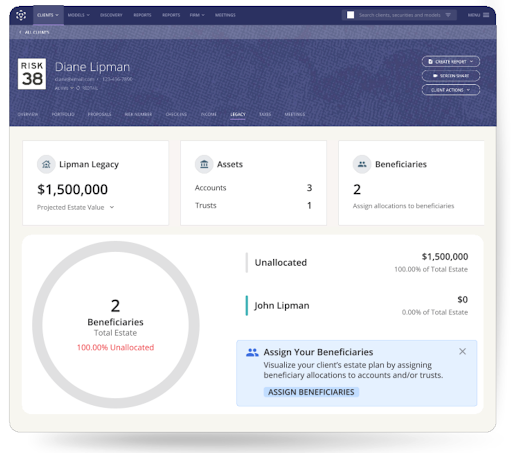
Legacy Map brings that information together in one visual view. Instead of walking through paperwork, advisors can guide clients through a clear picture of their legacy and how they intend to pass it on.

Legacy Map on Legacy Center dashboard

Legacy Map brings a client’s estate into one clear view, giving advisors and clients a shared starting point for legacy planning conversations.

Clients often ask better questions because they can see their plan unfold in front of them. Advisors can spot planning opportunities more naturally, whether it’s an outdated beneficiary designation or an asset that hasn’t been included in the discussion.

The meeting also becomes more collaborative. Rather than explaining information the client already owns, advisors can focus on helping clients think through the decisions ahead. Those conversations reinforce the advisor’s role as a long-term planning partner while creating a strong foundation for the next step: bringing beneficiaries into the conversation.

Once clients have a clear picture of their legacy, the next conversation becomes much easier: deciding how and when to introduce the people who will one day inherit it.

Make beneficiary introductions part of your planning process

The best time to meet a client’s beneficiaries is while the client can make the introduction.

Instead of meeting after a major life event, advisors have an opportunity to connect while the client is still part of the conversation. They can provide context, explain the relationship they’ve built over the years, and help establish trust from the very beginning.

That’s where Legacy Key comes in.

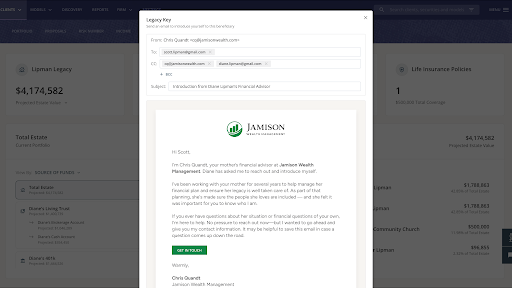
After adding a beneficiary to Legacy Map, advisors can send a personalized introduction through Nitrogen. The message can be customized with the client’s input and shared through the platform or from the advisor’s own email. The beneficiary receives the advisor’s contact information in a simple, mobile-friendly format, making it easy to save for future reference.

Legacy Key

Legacy Key helps advisors make a warm introduction while the client is still part of the conversation, creating familiarity before wealth changes hands.

The technology makes the introduction easy. The real value comes from what happens next.

Imagine a client introducing you to her daughter during a review meeting. Together, you send a Legacy Key before the meeting ends. Months or even years later, when she has a question about her family’s financial plan, she isn’t searching for an advisor online or sorting through paperwork to figure out who managed her parents’ accounts. She already knows who to call.

Instead of starting from scratch, the advisor builds on a relationship that began with the client’s endorsement. The beneficiary knows who you are, understands your role, and has already seen the value you provide to their family.

Legacy Key also gives advisors a repeatable way to make these introductions. Rather than relying on memory or waiting for the “right time,” the introduction becomes a natural next step after completing a client’s Legacy Map.

Over time, those small introductions can help create stronger multigenerational relationships. Clients gain confidence knowing their family has a trusted point of contact, while advisors create opportunities to stay connected as wealth moves from one generation to the next.

Give every legacy conversation a next step

Legacy planning rarely ends with a single conversation. Clients often leave a meeting with questions they want to think through or discuss with their family before making a decision.

Legacy Map Reports help keep that conversation moving.

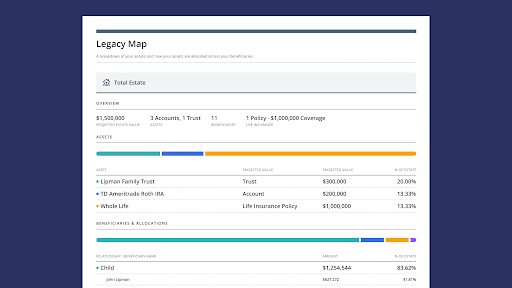
After updating a client’s Legacy Map, advisors can generate a personalized report through Nitrogen’s Report Builder. The report captures the client’s legacy in a clear, visual format that’s easy to review after the meeting.

Legacy Map Reports in Legacy Center

Legacy Map Reports give clients a clear reference they can revisit after the meeting, making it easier to continue the conversation over time.

That simple takeaway can extend the value of the conversation. Instead of relying on memory or handwritten notes, clients leave with a personalized resource they can revisit, share with family members, or bring into future planning discussions.

The report also gives advisors a natural way to continue the relationship. Future review meetings can start with the existing Legacy Map, making it easy to discuss what has changed and identify new planning opportunities over time.

Legacy planning is an ongoing process. Legacy Map Reports help advisors carry those conversations from one meeting to the next, creating a more connected experience for clients and a repeatable workflow for the firm.

Putting Legacy Center into practice

The webinar closed with one final recommendation for advisors who are just getting started: build your own Legacy Map first.

Walking through the experience yourself is one of the easiest ways to become comfortable with the workflow before introducing it to clients. You’ll see the product from the client’s perspective, anticipate common questions, and develop language that feels natural in a meeting.

Want to see the complete walkthrough? You can watch the full webinar to see Legacy Center in action from start to finish here.

Ready to bring Legacy Center into your client experience? Book a demo to learn how your firm can start building stronger multigenerational relationships.


Frequently asked questions

What is Legacy Center?

Legacy Center gives advisors a structured, intentional way to map a client’s estate and build a relationship with the next generation before a wealth transfer occurs. It includes Legacy Map, Legacy Key, and a report element advisors can add to any client deliverable.

What is Legacy Map?

Legacy Map pulls from data already in Nitrogen to build a complete visual picture of a client’s estate: accounts, trusts, insurance policies, and beneficiaries, all tied to real projected dollar amounts. Advisors can view the picture by account, by trust, or by beneficiary, giving clients a clear, shared reference point for legacy conversations.

What is Legacy Key?

Legacy Key is a personalized, advisor-branded introduction sent directly to a beneficiary through Nitrogen. It’s client-approved and includes the advisor’s contact information, a simple guide for what to do if something happens, and a landing page with clear next steps.

Can advisors customize a Legacy Key?

Yes. Advisors can edit the message before sending it, and can share it through their own firm inbox using the link provided in Nitrogen.

Does Legacy Map account for trusts and life insurance?

Yes. Advisors can group accounts into trusts and include life insurance policies as part of the estate picture, with allocation percentages assigned to beneficiaries for each.

How does Legacy Map calculate projected inheritance values?

Legacy Map uses data already in Nitrogen, including a client’s portfolio and income projections, to show real projected dollar amounts for each beneficiary. If the client has a Retirement Map built in Income Center, Legacy Map uses those projected end-of-life values for an even more accurate picture. Otherwise, it uses the client’s current portfolio values.

Can Legacy Map be included in a client report?

Yes. Legacy Map is available as a report element in Reports Builder. Advisors can add it to any client deliverable to produce a clean, multi-page PDF of the complete estate picture, advisor-branded and printable, so clients and their families have something to hold onto long after the meeting ends.

What is the Great Wealth Transfer?

The Great Wealth Transfer refers to the estimated trillions of dollars in assets that will pass from Baby Boomers to their children and grandchildren over the next two decades. For advisors, it’s the reason next-gen relationships matter now: when that transfer happens, assets tend to follow whichever relationship the family already trusts, and today that’s rarely the beneficiary’s own advisor. Legacy Center gives advisors a way to start building that trust before the transfer occurs, not after.

Client Confidence Returns to Pre-Dip Levels, But Advisors Keep Trimming Equity Exposure

June extended a trend that’s been building for several months. More clients said they felt positive about both the markets and their own financial future, while advisors continued taking a measured approach to portfolio construction.

Every month, Nitrogen analyzes more than 1,000 advisor-generated portfolio proposals to understand how advisors are responding in real time. June’s data tells a different story. Advisors stayed active, but they didn’t meaningfully increase portfolio risk.

Signal 1: Client mood

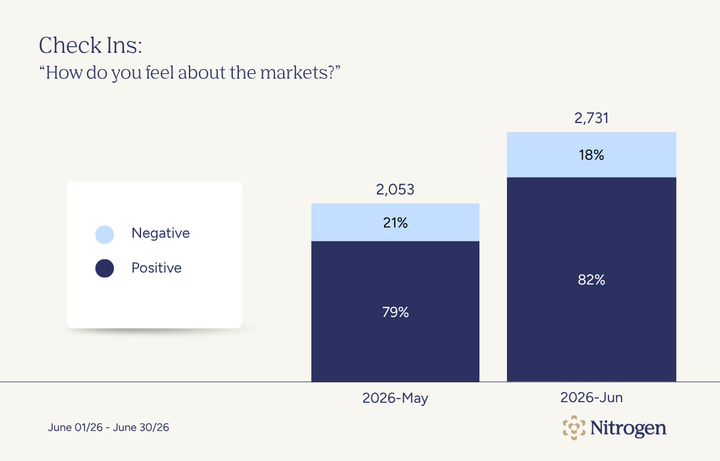
Client optimism continued to build in June. Eighty-two percent of clients said they felt positive about the markets, up from 79% in May. The gain was smaller than May’s jump, but it suggests the rebound in confidence is continuing. Clients appear increasingly comfortable with the current market environment.

Check-ins: “How are you feeling about the markets?”

July 2026 - Check Ins: How do you feel about the markets?Check-ins: “How do you feel about the markets?”
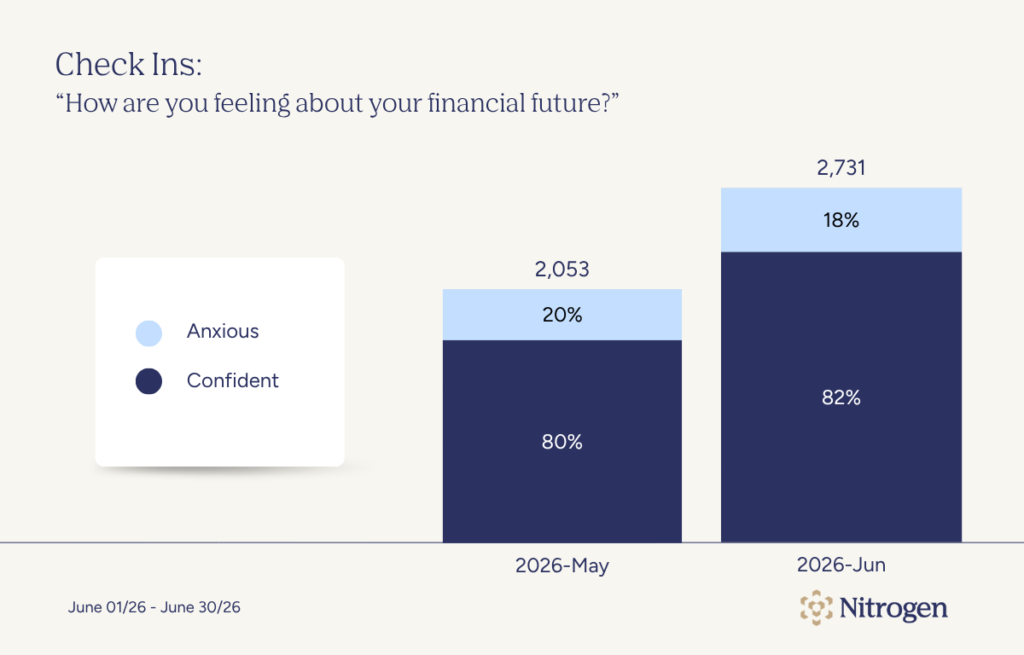
Confidence in personal finances also improved. Eighty-two percent of clients said they felt positive about their financial future, compared with 80% in May. That result stands out against a backdrop of lingering inflation concerns and uncertainty around interest rates, suggesting many investors remain focused on their long-term financial picture.

Check-in: “How are you feeling about your financial future?”
For advisors, that’s an encouraging combination. Clients who feel more confident may be more receptive to planning conversations, portfolio reviews, and other proactive discussions that can be harder to have when market anxiety is driving every meeting.

Signal 2: Risk posture

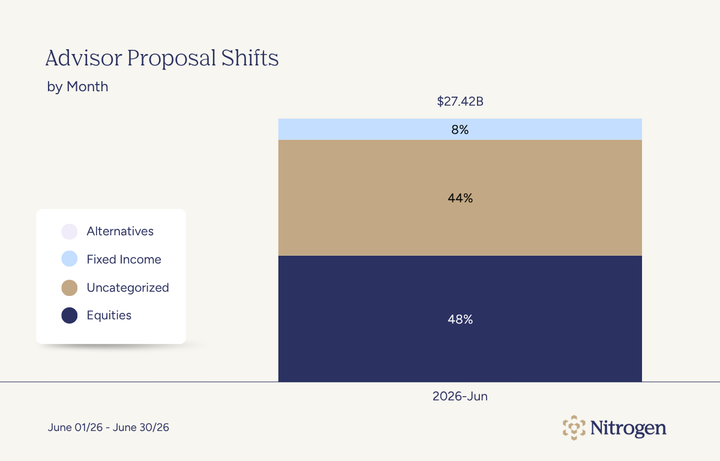
Advisors proposed slightly less equity exposure in June. Equities made up 48% of proposed allocations, down from 52% in May. Fixed income held at 8%, while uncategorized allocations rose to 44%.

June Advisor Proposal Shifts

This looks like a measured adjustment, not a broad move away from risk. Equity exposure moved lower, but stayed within the range advisors have used across recent months.

The better read is that advisors were being selective. Client confidence improved, yet advisors continued maintaining meaningful equity exposure without pushing portfolios further into risk.

Signal 3: Liquidity positioning

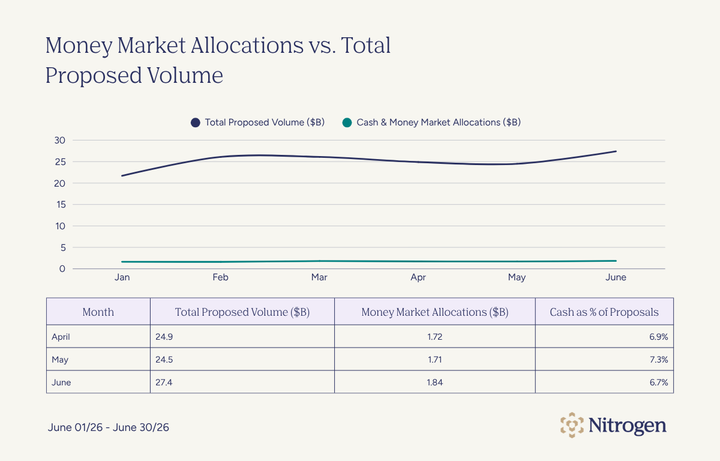
Cash and money market allocations remained a meaningful part of June proposals. Money market allocations represented roughly 6.7% of total proposed volume in June, compared with 7.3% in May.

June Money Market Allocations vs. Total Proposed Volume
Cash remained one of the most frequently proposed holdings, even as its share of total proposed volume eased. Advisors appear to be keeping liquidity available while continuing to position portfolios for participation.

That balance reflects June’s broader story. Client confidence improved, but advisors continued leaving themselves room to adapt as conditions evolve.

Signal 4: Advisor activity

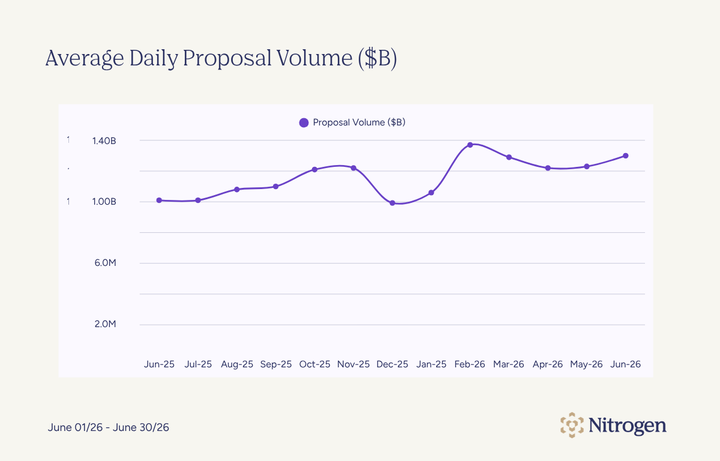
Advisor proposal activity increased in June. Average daily proposal volume rose to $1.30 billion, up from $1.23 billion in May. Average daily proposals generated also moved up to 1,160, compared with 1,140 in May.July 2026 - Average Daily Proposal VolumeJune Average Daily Proposal Volume

The increase wasn’t dramatic, but it was consistent. Advisors continued reviewing portfolios, building proposals, and helping clients make thoughtful decisions while remaining disciplined in their recommendations.

Signal 5: Concentration

The most frequently proposed investments in June were familiar names. Cash and money market vehicles led the list, followed by broad-market ETFs and funds such as SPY, IVV, IWV, FXAIX, VOO, and AGG. Apple, Nvidia, and the Schwab Value Advantage Money Fund also appeared among the top recurring products.

July 2026 - Top 10 Products ProposedJune Top Products Proposed

Broad index exposure remained central to portfolio construction. Technology exposure was still visible through Apple and Nvidia, but the overall list points more to core positioning than aggressive repositioning.

Advisors continued to express conviction through familiar, liquid building blocks. The product mix suggests they were refining portfolios rather than making major allocation changes.

Confidence returned, and discipline stayed

Client confidence continued to build in June, but portfolio changes remained measured. More clients said they felt positive about both the markets and their financial future. At the same time, equity allocations edged lower and familiar core holdings continued to anchor portfolios.

Taken together, the data suggests advisors weren’t letting stronger sentiment drive portfolio decisions. They continued refining allocations and engaging clients while keeping long-term plans at the center of the conversation.

See how advisors use Nitrogen data and Risk Number® insights to guide client conversations through changing markets. Book a demo today.

About Nitrogen Signals & Shifts

Each month, Nitrogen analyzes proposal and sentiment data from across its platform to help advisors understand what’s driving client decisions. With more than 1,000 proposals created daily, these insights highlight how advisors adapt and how investors stay invested.

Thank you for reading this edition of Nitrogen Signals & Shifts. The next issue will be published in August. 

How Software Helps Financial Advisors Create a Better Estate Planning Process

Most advisors know estate planning belongs in the client experience. The bigger question is whether their firm has a process for turning those conversations into long-term family relationships.

That question is important because estate planning is tied directly to retention. An advisor may spend years building trust with a client, only to have little or no relationship with the people who will eventually inherit the assets. By the time wealth transfers, it may be too late to start from scratch.

That’s why estate planning cannot be treated as a one-time document review. For advisory firms, it’s becoming a critical part of relationship management and building a sustainable practice.

The challenge is making estate planning a consistent part of the client experience. Most advisors can handle estate planning questions when they come up. The harder part is creating a process that encourages deeper conversations, keeps plans current as circumstances change, and helps clients involve family members when appropriate.

The right software, however, provides advisors a better way to organize estate information and involve the right people before a transition happens.

How top advisors handle estate planning

Estate planning works best when each conversation picks up where the last one left off.

A client may start by updating a beneficiary designation. A year later, that discussion may expand into broader questions about family goals, charitable giving, or which adult children should be involved in future conversations.

Over time, those details begin to shape a more complete picture of what the client wants their legacy to accomplish. Not just who receives which assets, but who needs to understand the plan, what the client wants to protect, and how they want important decisions handled in the future.

That’s what many of the strongest estate planning processes have in common. They’re built to evolve alongside the client’s life. The advisor isn’t reopening the same conversation every year or relying on memory to connect the dots. They have a process for carrying the conversation forward.

The challenge is doing that consistently across dozens of client relationships, and that’s where software can help.

How software creates a repeatable process

Estate planning has always involved a lot of moving pieces. What has changed is the software available to support it.

A decade ago, many advisors relied on a combination of meeting notes and paper documents to keep estate planning conversations organized. Today, software can help advisors create a more connected experience for clients and their families.

Some of the most useful developments include the ability to:

  • Help clients see the full picture. Estate plans can be difficult to discuss when information is spread across multiple documents and systems. Modern planning tools can bring those details together in a visual format, helping clients understand how assets connect to beneficiaries and long-term goals.
  • Capture context from important conversations. Clients often share details that become relevant months or years later. Software gives advisors a place to document those discussions so future decisions are easier to understand.
  • Carry conversations forward over time. Estate plans are rarely static. As circumstances change, advisors can update information and revisit previous discussions without rebuilding the entire picture from the beginning.

For firms trying to make estate planning a more consistent part of the client experience, that continuity is often the difference between a one-time planning discussion and an ongoing legacy planning process.

Extending the conversation to the next generation

Once advisors have a more structured process for estate planning conversations, another question naturally follows: Who else needs to be connected to that process?

For many families, the answer isn’t always simple. Some clients want their children involved early. Others prefer to keep details private. Some want a future trustee, executor, or beneficiary to know who to contact, but they don’t want to turn every estate planning conversation into a family meeting.

Advisors need a way to respect those preferences while still helping families avoid confusion later.

That’s especially important because the first conversation between an advisor and a beneficiary often happens during a difficult transition. If the beneficiary has never met the advisor, does not understand the advisor’s role, and does not know why the relationship exists, that moment can feel unfamiliar from the start.

Legacy planning works better when the introduction happens earlier.

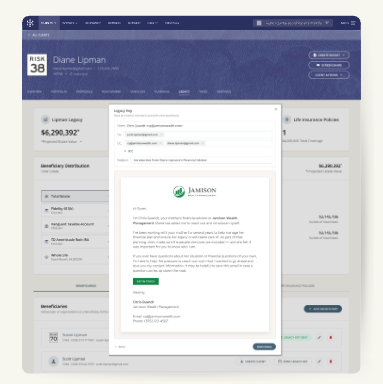
That is the idea behind Nitrogen’s Legacy Key. With the client’s approval, advisors can send a formal, advisor-branded introduction to beneficiaries before a major life event occurs. The beneficiary receives the advisor’s contact information and simple guidance on what to do if they need help in the future.

Legacy Key Example

Legacy Key helps advisors formally introduce beneficiaries before a major life event occurs, creating continuity across generations.

For clients, this creates peace of mind. They know the right people have a clear point of contact if something happens.

For beneficiaries, it reduces uncertainty. They don’t have to search through old files, find a business card, or guess who was helping their parent or loved one with important financial decisions.

For advisors, Legacy Key creates a practical way to extend the relationship beyond the client household. The introduction happens while the client can still provide context and decide how much information should be shared.

That small step can make a future conversation feel less like a cold handoff and more like a continuation of the planning process already in place.

A better way to support legacy conversations

Helping families navigate tough moments is one reason more firms are looking for ways to bring structure to legacy planning conversations.

For firms looking to make estate planning a more consistent part of the client experience, software tools like Nitrogen Legacy Center offer a practical place to start.

Interested in learning more? Book a demo to see how Nitrogen can help support legacy conversations across generations.


FAQ

How does software help financial advisors with estate planning?

Software helps advisors create a more structured process around estate planning conversations. It can bring estate details into one place, make complex plans easier to visualize, document key people and relationships, and create client-facing reports that advisors can revisit over time. This helps estate planning become part of the ongoing client experience rather than a one-time discussion.

Can estate planning software replace an attorney?

No. Clients should work with qualified legal and tax professionals when creating wills, trusts, and other estate planning documents. Software helps advisors support the communication side of estate planning. It can make the plan easier to explain, organize, and revisit, but it doesn’t replace legal advice or professional estate planning guidance.

How can advisors involve beneficiaries earlier?

Advisors can start by asking clients who they want involved and what they are comfortable sharing. Some clients may want a family meeting. Others may only want beneficiaries to have basic contact information. Software can help advisors document those preferences and create a clearer path for client-approved introductions.

What is Nitrogen’s Legacy Center?

Nitrogen’s Legacy Center helps advisors make legacy conversations more visual and intentional. Legacy Map shows accounts, trusts, insurance policies, beneficiaries, projected values, and allocation percentages in a clear estate picture. Legacy Key also helps advisors send formal, advisor-branded introductions to beneficiaries so they know who to contact when the time comes.

5 Things You Didn’t Know You Could Do With Nitrogen Complete

Nitrogen built its reputation on a few foundational workflows: quantifying a client’s Risk Number®, analyzing a portfolio, building a proposal, and creating a plan clients can actually understand.

Those capabilities put Nitrogen on the map, and they’re still core to how advisors use it every day to create clearer conversations around risk and investment decisions.

But Nitrogen Complete goes well beyond where the story started.

Some of the most useful capabilities in the suite aren’t necessarily the ones that get top billing in a product overview. They’re the tools that help move a client relationship forward, like preparing for a meeting in less time or finding a seamless way to involve the next generation in an estate planning conversation.

That was the focus of our recent webinar, 5 Things You Didn’t Know You Could Do With Nitrogen Complete. Here’s a look at a few of the workflows worth knowing about.

1. Let Nucleus handle the busywork

Most advisors think of Nitrogen as a client-facing tool. But one of the more useful capabilities in Complete is what it can do behind the scenes.

That’s where Nucleus comes in.

During the webinar, Stephanie Moore, Senior Success Coach at Nitrogen, walked through how Nucleus works as a built-in assistant inside the client profile. Rather than navigating through multiple screens or handling routine tasks manually, advisors can simply ask Nucleus for help.

Moore shared an example of an advisor who wanted to introduce a client to the Risk Number before an upcoming meeting. Instead of drafting the message from scratch, the advisor could ask Nucleus to create the email and prepare the questionnaire for delivery. What might have taken several steps becomes a quick conversation inside the platform.

The same idea carries into other parts of an advisor’s workflow. Nucleus can update a client’s retirement assumptions and requires advisor approval before any changes are saved.

Advisors remain in control of client decisions and records, while routine administrative work becomes easier to manage.

2. Start beneficiary conversations before wealth changes hands

Many advisors have spent years helping a client build wealth, only to discover that when assets eventually transfer, the next generation has little connection to the advisor behind the plan.

That’s one of the challenges Legacy Center was designed to address. By creating a visual map of a client’s estate, advisors can help families better understand how assets, beneficiaries, and estate wishes fit together.

One lesser-known capability within Legacy Center, however, is Legacy Key. Rather than waiting until a wealth transfer occurs, advisors can invite beneficiaries into the conversation ahead of time and establish a direct line of communication.

Legacy Key Example

Rather than waiting for a major life event, advisors can use Legacy Key to start beneficiary conversations earlier.

That small step can have a meaningful impact. It gives beneficiaries a clearer understanding of their future role and helps families prepare for important transitions. It also allows advisors to begin building relationships long before major decisions need to be made.

3. Extend your brand beyond the meeting

Some of the capabilities featured in the webinar were complex. This one wasn’t.

Nitrogen Complete includes report branding tools that allow firms to customize client-facing reports with their own visual identity. Advisors can incorporate firm logos, colors, and contact information directly into the reports clients receive. Firms with multiple offices can also apply branding settings more broadly to create a consistent experience across teams.

It’s an easy feature to overlook because it doesn’t fundamentally change how advisors work. What it can change is how clients experience the work advisors are already doing.

Consistent branding helps reinforce the advisor’s identity and creates a more polished experience from one interaction to the next.

For larger firms, it can also reduce the burden of maintaining consistency across offices, allowing advisors to spend less time managing presentation details and more time focusing on client relationships.

4. Make your firm’s investment approach easier to scale

Many advisory firms have developed their own investment strategies over time. The challenge is making those strategies easy for every advisor in the firm to access and use consistently.

That’s where Custom Strategies comes in.

As demonstrated during the webinar, firms can add their proprietary strategies to Nitrogen and make them available across the platform. Once a strategy is set up, advisors can use it in portfolios and proposals without having to recreate the same work themselves.

For firms with multiple advisors or multiple offices, this can create a more consistent experience for both advisors and clients. Instead of building around a strategy from scratch, advisors can spend more of their time focused on the client conversation.

Like several of the other capabilities highlighted in the webinar, Custom Strategies isn’t necessarily something advisors discover on day one. But for firms looking to standardize their investment approach, it can become a valuable part of the workflow.

5. Turn a tax return into a planning conversation

Most clients don’t walk into a meeting excited to talk about their tax return. Even when a 1040 contains valuable planning information, the document itself isn’t always the easiest way to have that conversation.

But during the webinar, Stephanie demonstrated how Tax Center helps advisors transform a client’s tax return into a visual snapshot that’s easier to understand and discuss. Rather than working through pages of tax forms line by line, advisors can use a client-friendly dashboard to highlight key details and identify opportunities for further planning.

[ADD IMAGE]

Tax Center transforms a client’s 1040 into a visual snapshot, helping advisors spend less time explaining tax forms and more time discussing planning opportunities.

That can be especially valuable with prospects. A tax return often contains information that can lead to broader planning discussions, helping advisors demonstrate value before a formal planning engagement even begins.

What else are you not using?

Every advisor has experienced it: you start using a piece of technology for one purpose, then months later discover a capability that changes how you work.

The tools highlighted here may not be the first capabilities that come to mind when you think about Nitrogen Complete. But they illustrate how much value can be hiding in workflows that are easy to overlook.

Want to see what else you might be missing? Watch the full webinar or schedule a demo with the Nitrogen team.


FAQ

What is included with Nitrogen Complete?

Nitrogen Complete includes Nitrogen’s core tools for risk, portfolio analysis, proposals, research, and income planning, along with capabilities such as Tax Center, Legacy Center, Nucleus, report branding, and Custom Strategies.

How is Nitrogen Complete different from Nitrogen Elite?

Nitrogen Elite includes many of Nitrogen’s core centers. Nitrogen Complete sits above Elite and adds more capabilities under one subscription, including Tax Center and Legacy Center.

Does Nitrogen Complete include AI?

Yes. Nitrogen Complete includes Nucleus, Nitrogen’s AI-powered assistant. Advisors can use Nucleus to prepare for meetings, draft client communications, update information, and reduce manual work inside Nitrogen.

Can advisors use proprietary investment models in Nitrogen Complete?

Yes. Custom Strategies allows firms to add proprietary models and custom strategies to Nitrogen so advisors can use them in portfolios, models, and proposals.

The AI Due Diligence Questions Every Advisory Firm Should Be Asking

Advisors may think they’re making a decision about software, but increasingly, they’re also making a decision about AI.

AI is no longer arriving through standalone tools. It’s being added to the software advisors already use every day. Meeting notes. Client communications. Planning insights. Portfolio analysis.

That’s creating a new due diligence challenge. Advisors need visibility into how AI is being used inside the software they rely on.

Why AI changes vendor due diligence

For years, software due diligence was relatively straightforward.

Advisory firms could evaluate a platform’s functionality and review its security controls. While no software is completely risk-free, most systems behave in predictable ways.

AI introduces a new layer of evaluation.

As AI becomes embedded in advisor technology, firms need to understand more than what a product does. They also need to understand how information is generated, how client data is handled, and what safeguards exist when AI is involved.

That matters because advisors are increasingly encountering AI through tools they already use every day. Many new features and workflows in vendor products now include AI-generated content behind the scenes.

The technology can be incredibly useful. It can save time and reduce manual work. But it can also make software harder to evaluate. When an output is generated by AI, understanding where it came from and how it was produced isn’t always straightforward.

Of course, advisors are not expected to become AI experts. Most firms will never inspect a model or review source code. Instead, they will rely on vendors to make responsible decisions about how AI is built, deployed, and governed.

But this means transparency becomes extremely important.

A vendor’s AI strategy should be more than a product announcement or a feature label. Firms should be able to explain what oversight exists around AI-generated outputs and how information can be verified before it reaches a client.

The same standards advisors apply to client service still apply when AI enters the workflow. If a chart, recommendation, summary, or client communication comes from an AI-powered feature, the advisor still needs to understand it well enough to stand behind it.

The risks advisors should care about

For advisory firms, two concerns rise above the rest: data exposure and reliability.

Many AI tools require access to client information to produce useful results. That creates an obvious question: where does that information go once it’s entered into the system?

In the wrong environment, sensitive client data can be exposed beyond the advisory firm. Information entered into an AI tool could be retained longer than expected, shared with third parties, or used in ways the advisor never intended.

Consider a simple meeting summary. An advisor may enter detailed notes about a client’s finances, family situation, or future plans without realizing how that information is being processed behind the scenes.

If something goes wrong, clients and regulators are unlikely to focus on which vendor was responsible. They’ll look to the advisory firm that collected the information in the first place.

The second risk is reliability.

Generative AI can produce content that sounds polished and complete while still getting important details wrong. A meeting summary may misinterpret a conversation. A client communication draft may omit important context. An AI-generated insight may reflect an incorrect assumption.

The challenge is that these mistakes are not always obvious. An advisor may not discover the issue until the information is already being used in a client deliverable.

That’s what makes AI different from many traditional software tools. The output can look credible even when it contains errors.

Client-facing advice requires a higher standard. Before AI-generated content reaches a client, advisors need a way to review it, verify it, and understand where it came from.

What advisors should ask AI vendors

By this point, the conversation shouldn’t be about whether a vendor uses AI. Almost every vendor has an AI feature or workflow now embedded in their platform.

The better question is whether they can explain how they’re using it.

A handful of questions can reveal a great deal about how seriously a vendor approaches AI governance.

  • Is my data used to train AI models? You shouldn’t have to guess. The answer should be written down and backed by the vendor’s agreement. If the answer is yes, firms should understand exactly what data is being used and under what circumstances.
  • Can I see your latest SOC 2 report? No certification guarantees good behavior, but firms should be cautious when a vendor has nothing to show. Advisors should also understand whether the controls apply to the systems powering the vendor’s AI capabilities.
  • How do you govern AI? Some vendors will point to ISO 42001 certification. Others may have their own governance framework. The important thing is whether they can explain how decisions are made, how risks are reviewed, and who is accountable when something goes wrong.
  • Can I review AI-generated content before it reaches a client? AI should support advisor judgment, not replace it. Advisors should be able to review summaries, communications, and other client-facing content before anything is shared.
  • Can I verify where an AI-generated output came from? Advisors shouldn’t have to take an AI-generated answer on faith. They should be able to see step by step how it was produced. 
  • Do AI-generated outputs remain consistent over time? If the same input produces meaningfully different outputs every time, advisors have a problem. Client-facing information needs to be understandable enough that an advisor can explain it with confidence.

The strongest vendors will answer these questions directly. The weakest will rely on marketing language and broad assurances.

No due diligence process can eliminate every risk. But these questions can help advisors separate AI capabilities from AI governance and make better decisions about the technology they bring into their practice.

What strong AI governance looks like

Most advisors won’t inspect a model or review source code. That’s not the job.

The job is asking questions and expecting clear answers. Advisors should understand how client information is handled, how AI-generated content is reviewed, and where responsibility sits when something goes wrong.


FAQ: AI governance for advisors

What is AI governance?

AI governance refers to the policies and controls a company uses to manage AI. For advisors, it comes down to a few practical questions: How is client data handled? Who reviews AI-generated outputs? And what happens when something goes wrong?

Why should advisors care if they aren’t building AI themselves?

Most advisory firms will encounter AI through the software they already use. Advisors may not build the technology, but they are still responsible for the information they use with clients.

What questions should advisors ask AI vendors?

Start with the basics. Is client data used to train models? Can AI-generated outputs be reviewed before they reach a client? Can those outputs be verified? The answers reveal a great deal about how seriously a vendor approaches AI governance.

What is a zero-training commitment?

A zero-training commitment means a vendor doesn’t use customer data to train or fine-tune AI models. Advisors should look for that commitment in writing and confirm that it applies to any third parties involved in generating AI outputs.

Client Confidence Jumped 13 Points. Portfolios Barely Moved.

May brought the kind of optimism that can tempt portfolios off-plan. The data shows advisors didn’t take the bait.

Markets reached new highs. The anxiety that defined March and April faded fast. And yet, when you look at how advisors actually repositioned client portfolios, the story isn’t a rush to risk. It’s a remarkably steady hand.

Each month, Nitrogen analyzes more than 1,000 advisor-generated portfolio proposals per day to better understand how advisors are adjusting portfolios in real time. In May, the data showed improving client sentiment, higher equity allocations, and steady proposal activity.

Signal 1: Clients Came Back to the Table

The sentiment recovery in May was sharp. Nearly 79% of clients said they felt positive about the markets, up 13 percentage points from 66% in April, and well above the 52% low recorded during March’s volatility spike.Check-In Graphic 1, June 2026 Signals & Shifts

May Check Ins: How Do You Feel About the Markets?

Confidence in personal financial futures followed. 80% of clients reported feeling confident about their financial outlook in May, up from 74% in April. This is the second consecutive month of improvement.Check-Ins Graph 2, June 2026 Signals & Shifts

May Check Ins: How Are You Feeling About Your Financial Future?

One data point worth noting: advisors sent an average of 431 check-ins per day in May, down from 646 in April and a peak of 862 in March. The timing suggests — though doesn’t confirm — that advisors were leaning into proactive client communication during the height of the volatility, then pulled back as conditions stabilized and clients found their footing again.

Signal 2: Advisors Moved Into Equities. Carefully.

With sentiment recovering and markets hitting new highs, advisors did increase equity exposure in May. Equities accounted for 52% of proposed allocations, up from 50% in April. Fixed income held flat at 8%.Advisor Proposal Shifts, June 2026 Signals & Shifts

May Advisor Proposal Shifts

Two percentage points. That’s the magnitude of the move. Advisors increased equity exposure but didn’t chase the rally, keeping allocations within the range they’ve held all year.

Signal 3: Cash Stayed in the Picture

Money market allocations ticked up in May, reaching 7.3% of total proposed volume, compared to 6.9% in April.Money Market Allocations Table, June 2026 Signals & Shifts

May Money Market Allocations vs. Total Proposed Volume

The increase came during a month when client confidence improved, and advisors modestly increased equity exposure. Advisors put more capital to work while maintaining liquidity for future opportunities and client needs.

Signal 4: Proposal Activity Held Steady Into Recovery

Average daily proposal volume came in at $1.23 billion in May, essentially flat from $1.22 billion in April.Average Daily Proposal Volume, June 2026 Signals & Shifts

May Average Daily Proposal Volume

Advisors generated an average of 1,134 proposals per day in May. Markets were calmer, client confidence was up, and advisors kept working at the same pace.

That kind of sustained activity during a recovery month tends to signal that advisors are actively helping clients get positioned, instead of waiting for clarity.

Signal 5: Core Holdings Continued to Dominate

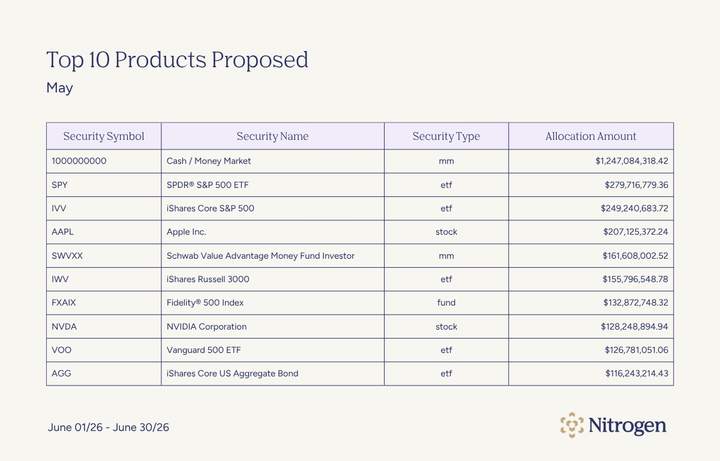
The most frequently proposed investments in May were familiar names. Cash and money market vehicles topped the list, followed by broad-market ETFs such as SPY, IVV, and VOO. Apple, Microsoft, and Nvidia were also among the most commonly proposed holdings.Top 10 Products Proposed, June 2026 Signals & Shifts

May Top Products Proposed

Advisors continued to favor liquid, widely used investment vehicles. Even as client confidence improved and equity allocations moved higher, proposed portfolios relied heavily on established building blocks rather than specialized strategies.

Growth-oriented investments remained well represented, particularly through large-cap technology stocks and index funds. The overall picture was steady portfolio construction, without dramatic repositioning.

Confidence Surged. Portfolio Changes were Modest.

Investor sentiment recovered faster than portfolios moved. Confidence in the markets jumped 13 points. Equity allocations moved 2. Cash inched up. Proposal volume held.

That gap between how clients feel and how advisors are positioning them is worth paying attention to. It suggests advisors are doing exactly what they should, letting plans drive decisions, not headlines.

See how advisors use Nitrogen data and Risk Number® insights to guide client conversations through changing markets. Book a demo today.

About Nitrogen Signals & Shifts

Each month, Nitrogen analyzes proposal and sentiment data from across its platform to help advisors understand what’s driving client decisions. With more than 1,000 proposals created daily, these insights highlight how advisors adapt and how investors stay invested. Thank you for reading this edition of Nitrogen Signals & Shifts. The next issue will be published mid-July. Subscribe at the top of this post so you never miss an update.

Why Heirs Leave Advisors and How to Build Relationships That Last

An advisor spends 20 years serving a family.

They help a couple retire with confidence. They guide them through market volatility, major life events, and countless financial decisions. Over time, they become a trusted part of the family’s life.

But then the client passes away. Six months later, the assets are gone.

The advisor didn’t lose the relationship overnight. The problem is that they never had a strong relationship with the next generation, who would inherit those assets.

And for many advisors, that’s the challenge at the center of generational wealth transfer.

Why Heirs Leave Their Parents’ Advisor

Over the coming decades, more than $80 trillion is expected to move from one generation to the next. 

Yet recent research suggests that as many as 70% of heirs leave their parents’ financial advisor after inheriting wealth. For advisory firms, that can mean lost assets and opportunities to continue serving families they have spent years helping.

The reason is often simpler than advisors think.

Beneficiaries inherit accounts, trusts, insurance policies, and other assets. What they do not always inherit is the context behind them. They may not understand the goals that shaped the plan, the decisions made along the way, or the role the advisor played in helping their family navigate major financial events.

And in many cases, the beneficiary’s first meaningful interaction with the advisor happens after a death or other major life transition. By then, the advisor is trying to build trust during one of the most emotional and uncertain moments in a family’s life.

In many ways, it’s a bit like walking into a classroom as a substitute teacher halfway through the school year. The lesson plans are there. The notes are there. The grades are there. But the trust between teacher and student still has to be built.

Estate plans transfer assets, but they cannot transfer relationships.

When beneficiaries have little familiarity with the advisor before an inheritance occurs, moving assets elsewhere can feel like a natural next step rather than a deliberate decision to leave.

Build Relationships Before the Transfer

Advisors cannot wait until assets transfer to begin building trust with beneficiaries.

By that point, it’s likely that they already have another advisor. Or they may simply have no reason to believe their parents’ advisor is the right fit for them. The advisor may have years of context, but the beneficiary has little personal connection to it.

Instead, the better approach is to make next-generation relationship-building part of the legacy planning process while the client is still involved.

That doesn’t mean including adult children in every client meeting. It also doesn’t mean treating family conversations like prospecting opportunities. The goal is familiarity.

Beneficiaries should have some sense of who the advisor is and why the family trusted them. They should understand the broad purpose behind the plan before they are asked to make decisions about it.

That kind of trust is easier to build before a family needs it.

When clients are willing, advisors can help create a bridge between generations. This way the first meaningful conversation with an heir isn’t happening during one of the hardest times of that person’s life.

How to Involve the Next Generation

Building familiarity with beneficiaries doesn’t require a completely new process. In many cases, it starts with a few intentional steps that help families communicate before a transition occurs.

  • Ask clients what they want shared. Some clients want adult children involved. Others prefer to share only high-level information. Start with the client’s comfort level and document it.
  • Create a family contact plan. Identify the people who may need to be involved later, including heirs, trustees, executors, attorneys, and CPAs.
  • Invite heirs into selected conversations. Focus on moments where context matters, such as legacy goals, charitable intentions, or what to do if something happens.
  • Explain the purpose behind the plan. Beneficiaries may see accounts and balances without understanding the decisions behind them. Help clients explain what the plan is meant to accomplish.
  • Use visuals to make the legacy clearer. Tools like Nitrogen Legacy Center can help advisors map accounts, trusts, insurance policies, beneficiaries, projected values, and allocation percentages so families can see how the plan connects.
  • Give heirs a clear first step. Make sure beneficiaries know who to contact and which decisions can wait.

Turning Legacy Planning into Relationship Planning

Most estate plans answer a practical question: Where should the assets go? But families often need help answering another one: Who should we call when this happens?

For beneficiaries, inheritance often arrives with questions that documents alone cannot answer. What did the client intend? Why was the plan structured this way? What should happen first? Which decisions can wait?

Advisors who help families prepare for those conversations before a transition occurs can create a clearer experience for everyone involved.

That is the idea behind Nitrogen Legacy Center. It helps advisors make legacy conversations more visual, organize key beneficiary details, and create client-approved introductions before the moment of need.

Interested in learning more? Book a demo to see how Nitrogen can help you build stronger relationships across generations.


FAQ

Why do heirs leave financial advisors?

Heirs often leave because they have little or no relationship with the advisor before assets transfer. They may know the advisor worked with their parents, but they have not built personal trust, discussed their own goals, or understood the plan behind the portfolio. When beneficiaries already have another financial relationship or prefer a different service model, moving assets can feel like the easiest next step.

How can advisors build relationships with beneficiaries earlier?

Advisors can ask clients whether they want to include adult children or other beneficiaries in selected planning conversations. These meetings can focus on education, family intentions, key contacts, and basic next steps. Nitrogen Legacy Center gives advisors a structured way to make those conversations more visual and intentional by helping clients map beneficiaries, accounts, trusts, and projected legacy values.

What is Nitrogen Legacy Center?

Legacy Center is designed to help advisors connect legacy planning with relationship-building. Legacy Map creates a visual estate picture using data already in Nitrogen, including accounts, trusts, insurance policies, beneficiaries, projected dollar amounts, and allocation percentages. Legacy Key, launching soon, will allow advisors to send formal, advisor-branded introductions to beneficiaries.

How can the Risk Number® help with next-generation conversations?

The Risk Number is an objective, quantitative measurement of an investor’s true risk tolerance and the risk in a portfolio, calculated on a scale of 1 to 99. With beneficiaries, it gives advisors a concrete starting point for early conversations about downside comfort, long-term goals, and portfolio expectations. That shared language can make first meetings feel more grounded and less overwhelming.

Can Nitrogen Legacy Center replace legal estate planning?

No. Legacy Center is not a substitute for legal, tax, or estate planning advice. It helps advisors organize legacy conversations, visualize estate details, and create beneficiary introductions. Clients should work with qualified legal and tax professionals for estate planning decisions.